Secure AI
The agentic network: Secure private connectivity for agents

Nikita Cano
Cloudflare
0:05Good afternoon. I hope you're enjoying day two of Cloudflare Connect. My name is Chris. I'm a customer engineer based out of London usually. So I help customers be faster and safer on the internet. 4 ,000 applications. Anyone guess the relevance of that number? You might have heard it a few times over the last couple of days. So there were 4,000 applications. that were created from scratch over 30 days by Cloudflow's own people. So, these are people in finance, HR, sales, marketing, not just engineering, people.
0:44Just a quick show of hands, who's built something? And it's everyone's hand-triggered for this question in the last year or so with an AI assistant. And, no, well, people have hands on up. Keep your hands up. if the thing that you built spoke to a service in production? So, an API, a database, system of records. Okay, it's quite a few hands up. So, this is really what the focus of the talk today is about.
1:10So, one of those applications that got built by Cloudflare was built by one of my colleagues in sales. They built what they call a super app. They're very proud of it, and they just asked for a few keys to production servers for the app to do what it needs to be able to do.
1:26Yeah, just a couple of API keys. So, we wrote a blog about this recently, and the application itself is the easy part. We can all write applications with AI coding systems. We can get them running very, very quickly, and thanks to Cloudflare, deployed very, very quickly as well. But now we've got a potentially, you know, with the five minutes that took us to provide code this application, this is now a production live service, maybe even on the internet, that has to defend... itself against the rapidly changing threat landscape on the internet. So, the next 15 minutes or so, I might get short and sharp. We're going to deploy a couple of apps onto Cloudflare. So, quick prayers to the demo gods. So, both the live demo and AI agent coding.
2:12We'll watch them go into production, watch them go live. We'll give them production API keys. And then I'll show you some things to watch out. for and some design patterns that you may want to consider when your teams are doing this.
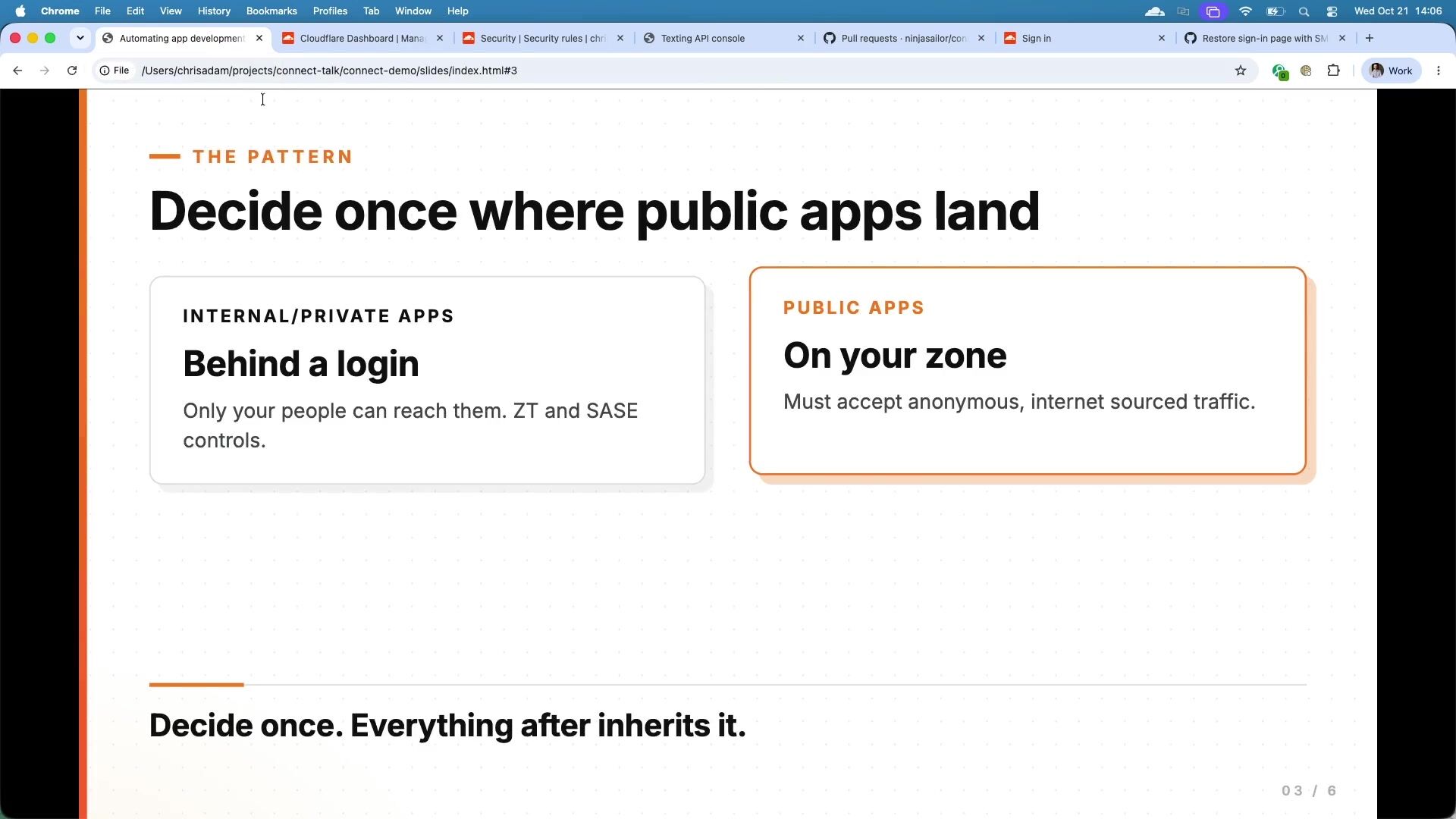
2:28So a quick note on scope. Broadly speaking, there's two types of applications. You've got private, internal applications. And generally speaking, these are kind of easier to defend because we've got some really great SASE and Zero Trust tools at Cloudflare and elsewhere. And these can simply be protected by block everything. unless they are an authorized user with a corporate device and so on and so forth, or the usual SACI tools that you can use on Cloudflare or elsewhere.
2:59Then you've got public applications, which is really what we're talking about today. So, these applications need to sit on the internet, they need to be accessible via anonymous traffic, and they need to service this internet-sourced traffic. So, we know that the... the internet is a very dangerous place, and these applications need to be able to defend against this evolving threat landscape.
3:25So, let's jump into the Cloudflare dashboard then. So, you're looking at the worker's home screen. Hopefully, that's nice and big, so you can see that. This is the worker's home screen. On the right-hand side, you have Agent Lee. If you haven't played with Agent Lee, I highly recommend you do. Agent Lee is Cloudflare's dashboard native agent. It can do things like add rough rules, report on security analytics and traffic analysis. It can modify CDN policy, but Agently can also deploy workers' applications to Cloudflare, which is really good. So I'm just going to paste a predefined prompt in here and get this whirring away while I talk. So imagine the scenario. We're a company. We've got a production API server. It's protected by an API token. And this server is a one-time pin.
4:12server. So, we have a requirement to generate one-time bins and the demo gods are not on my side today. So, let's just try this again. So, our one -time bin, our production API server, is properly authenticated. It has authentication in place. You need an API key to connect to it. And our requirement, we've given a task to one of our developers to create a nice shiny new end for this oh this is great isn't it the amount of times i've practiced this and it's been perfect um anyway so let's keep this going i'll just try this way we're going to deploy a nice shiny front end uh for this production server because we want to update our customer experience we want to align it with our brands it's just an example but we want to create a front end that connects to a back end service wow this is great so i have prepared for this.
5:08I'm not sure whether it's my internet connection or the Wi-Fi or what, but this was working great earlier. Let's try one more time. If not, we'll go to the fallback plan. Okay. So, the plan was to get Agent Lee to deploy a nice, shiny application onto Cloudflare workers and demonstrate how quickly and easily you can get applications running on Cloudflare. It doesn't look like that's going to happen, unfortunately. keep it when we go, but what we'll do is we'll go back to the one I made earlier down here.
5:43So, this was one I deployed with Agenda Lee before. It's exactly the same idea. I gave it a prompt. I said, I'll show you the prompt. It just says, build a worker's application called sign in. It serves a simple page. It takes a phone number as an input, and then that gets sent off to the API. The important thing here is it's sending a post request, right? I'm giving it the formatting of the JSON to do the post. It's just sending a request to it. our production API server, and then importantly, I've given it the API key down here, right? So here's the API key, send it as a header, and I'm doing it properly. I'm storing it as a secret. I'm not just putting it into the application hard-coded. I'm storing that API key as a worker secret, right? So in theory, no one should be able to get, and there's a key there. I'll delete that pretty quick, but that's the key. So I've given the agent the key, and this is what happens all the time, is people are giving agents keys to things, goes into an application which...
6:33internet facing. So, add a QR code as well. So, if we just do this, so I can show you as if that had gone, if that had deployed, this is what you would see. Before I show you that, actually, this is the dashboard. So, this is the stats dashboard of our production API server. This is just showing us how many texts we've sent today, the production API server sent today. The way this works is our server talks to our vendor and that vendor sends text messages to our customers, we've got to pay for that, right? So, we kind of care about this a little bit, but we need to provide this service. So, we've sent 35 text messages today. If we go back to the dashboard, I've deployed the service. You can scan the QR code. This is the thing that was deployed by the agent.
7:20It just takes a phone number. We can check that it works.
7:27And... There we go. So, we had 35 there before. I've sent a few more codes there through. So, in theory, we should see 37, 38. That's going up very quickly. Did somebody happen to scan that QR code just now? So, that was flooding me with traffic. No? Have we ever got a bad actor in the room that's just decided to attack my service? No?
7:52So, I think what's happening here is this is a SMS pumping attack. SMS pumping, what bad actors can do is they'll go away and they'll register a very expensive premium rate phone number, and they'll enter into a revenue share with the operator, the telco. And in return for generating traffic to that phone number, the bad guys will take a cut of that revenue. Unfortunately, it's quite a common thing that we see. And I think this is what's going on here. Someone in the room has decided to launch an SMS pumping campaign against my brand new application, but I secured quite well. I put API keys in a worker's secret. But really, all I've done is I've just created another entrance into my production API server. So this is not good. How can we stop this attack? Well, luckily, Cloudflare happens to have a market-leading application security platform.
8:38So WAFs, bot management, Raylimaxing, APIs protection. And we can look at implementing this in front of our worker. So firstly, how can we fix this one? Well, when we look at the application that, agently, I can close you, you've been useless, even though it's helpful to me whatsoever. So, let's close that. Lee would have deployed the application, and we asked it to make it available on the internet. And that's exactly what it did. But if you look here, it's deployed the application onto a workers.dev domain. Now, that's really good for quick prototyping, rapid iteration, trying out new ideas. But it's not really designed for production because workers.dev is not owned by you as an organization. You can't apply security policies to it as such. So, let's turn that off. What that'll do is it will remove the application I deployed from that workers.dev domain.
9:29Now, what I can do is I can connect it to something I do own. So, I've got a Cloudflare account. I've configured all my security policies already. I've set up my bot management rules. I've set up my rate limiting configuration. I want to bring my worker into that environment. So, you can see down here, we've got custom domains, and I've attached my worker into my custom domain.
9:49I'll show you a bit more of that in a minute, but while we're here in the workers' pages, just as a general bit of good practice advice,
9:57when you are deploying workers, if I can... Yep, down the bottom here. So, Cloudflare Access is Cloudflare's zero-trust elements of our SASE platform. One really good practice to do if your team are deploying workers into Cloudflare is just turn this on, and this will automatically protect any worker's application you deploy with Cloudflare Access. access. So it just removes that threat you just saw entirely. This works really well when workers are internal, they're private, they're not ever going to be on the internet. In my case, I do want my application to be on the internet, so I can't tick this button over here. Previews only is quite a cool feature where as your team are developing features that may be merging to new branches, adding features, then you can actually generate a unique URL per worker feature. And you might want to protect that by access because that's an internal feature being developed.
10:47So in my case, I want to leave the previews on but leave all traffic still off because I want the internet to access my application just with a bit more security in front of it. And then you can define how that policy works. So really good tip for deploying workers into your account.
11:05So where do we get to? I've now moved my worker into my account. What does that mean? Well, if I go into the domain... that I added it to, which was in here. There we go. So I've got my security dashboard. I've got my bot management turned on. So I'm blocking requests that come through with a low bot score. I've got a rate limiter in there because I don't want, it's very unusual that a human would send more than, I don't know, five requests in a minute to a one-time pin. So you can enforce those kinds of rate limits. Very basic trivial security tools, but very important that they are in place. And, then finally, you've got the Cloudflare WAF turned on as well. Just on the note of the Cloudflare WAF, you may have heard about the PHP vulnerability. I think everyone's heard about the PHP vulnerability that dropped last night.
11:53One of the reasons you want to deploy applications into a secure environment is because we never know what the next vulnerability is going to be. And by deploying a worker into a secure environment, not saying that workers use PHP, but in this case, you would have been protected straight away from that vulnerability. So another good reason to make sure that as your teams are deploying, they're vibing. coding projects into an environment, they inherit security by default. So what I showed you there was deploying a worker, maybe in a less good practice way, it got attacked and we removed it and put it into a secure environment. But how can we make this the default rather than just fixing it after we've already had the attack? So there's two ways, two things I'd like to show you, or two patterns you can use to make this the default rather than having to run around fixing things. By the way, you can use Agent Lee if you've got a situation where you've got 100 workers deployed in your account and you're not sure where they live, you can use Agent Lee.
12:44It will work for you, I promise. It was just me, I guess. But you can use Agent Lee to actually ask it, which of my workers are not protected? Help me move my workers into a secure environment and it will walk you through that process. But how do we make this the default? Well, you've got a couple of options. We'll open up an IDE, which may be more familiar in terms of a developer writing an application. This is the app on... the middle. I've sent this agent exactly the same prompt as I sent to Agent Lee. It's generated the project and it's ready to be deployed. Now, you may have heard of Wrangler. Wrangler is CloudFlare's CLI for testing, prototyping, building applications on CloudFlare. It can also access the whole developer platform, so it can push secrets into secret store. It can access kb and drillable objects, but what we can do is we can use Wrangler.
13:34to deploy the application rather than just doing it in the dashboard itself. Wrangler comes with a configuration file called Wrangler Toml or JSON, whichever version you're using. This is the Toml version here. Now, importantly, you can define a couple of very important settings in the Wrangler configuration file. And this just removes the workers.dev domain and the preview URLs just by default. So when your development team are deploying workers, they won't ever land on a workers.dev domain. The second one down here is the pattern. So, I'm basically telling the worker to attach itself to my own zone where my security lives. So, I can run Wrangler deploy, and that's great. The problem with that is my agents can still access this configuration file, and these settings may not be enforced.
14:19So, we want a deployment pipeline to be looking at this, ideally, so we can enforce these values. The better way of doing this, in my opinion, is to use worker's builds. Now, what I've done with this agent is I've asked it to make all the changes, create the application, and then open a PR against my repo, so I can then go in and approve it. And an agent may well go and approve this. So you'll see at the end of the prompt here, it's open to PR. Open the PR, and then I can review that PR. This is the new application that's going to sit in front of my production API. I can just merge that PR. I go back into the Cloudflare dashboard, go to my...
15:02and then you will see down here, this is the application that is deployed using this good practice. It's called Connect Sign-in Demo. It's been attached to my own domain, so chrisadam.dev, and you will see, it might have already finished, but you will see that what I did there was I merged the PR in GitHub. I've connected my project in Cloudflare to that GitHub repository, and you'll see down here that there's a build running because Cloudflare... has detected that I've merged a PR on main in the GitHub repository. That agent never touched Cloudflare. The agent never had access to Cloudflare, never had a Cloudflare API token. All it had access to was the repo that it made the change to. I've then set up as a security person at Cloudflare who owns this account. I've set up a synchronization between Cloudflare and the repo. When I've merged that code, it's then pulling the repo in and the demo codes are really not on my side today because this usually takes five seconds to deploy.
15:54is that will get pulled into Cloudflare, built and deployed as a worker within my secure environment and be protected from those threats that we saw earlier. So I'll let that finish. Just to summarize then, when you're deploying workers, we want to make sure that the application arrives inside our secure, predefined security boundary. What we did at the beginning there was what this looks like here. It was an application deployed onto workers.dev, grave approach at home. being really quick and fast, but not so good from a security perspective, what we want to do is this. So move the application we're deploying into the secure boundary and make sure that it inherits the security you have in place for the rest of your production environment. Just to wrap up then, and have some time for questions, there's three ways that I've talked about right now anyway of deploying apps with Cloudflare.
16:43Number one, lots of freedom, very fast, good for quick prototypes. The agent just writes code and pushes it up to Cloudflare. You don't have much control over that in this example. Number two there was using guardrails in the configuration. So again, really good for somebody that's a bit security-minded. They have access to the Wrangler configuration file. They are controlling where it lands in the configuration file itself. That gives them a lot of freedom without imposing too many guardrails. And then the last one is probably the most secure in terms of secure development. You have an agent that writes code. It opens a pull request on existing projects. That's it. The project is linked to Cloudflare through Worker's Builds. Worker's Build will detect the merge into main, and it will then pull in those changes, rebuild, and redeploy the application on Cloudflare, but importantly, inside your secure boundary, so you are not going to be exposed to SMS pumping attacks and the big, scary internet that exists and the rapidly changing landscape that we face ourselves with.
17:42So essentially, let AI write more and more and more, but make sure that we can... where the application lands, in this case in a Cloudflare secure environment. That's everything I wanted to share with you today. Thanks very much.
Nikita Cano
Cloudflare
Rohin Lohe, Will Papper
Cloudflare
Bryan Becker
Cloudflare
Be the first to know when registration opens and the agenda goes live.
---
title: "Automating app development the secure way: Velocity meets defense in depth"
url: "https://www.cloudflare.com/connect/2026/session/automating-app-development-the-secure-way-velocity-meets-defense-in-depth"
year: 2026
---

# Automating app development the secure way: Velocity meets defense in depth

[Watch session](https://www.cloudflare.com/connect/2026/session/automating-app-development-the-secure-way-velocity-meets-defense-in-depth)

## Session details

- **Track:** Secure AI
- **Topics:** AI security & audit, App modernization, Cloudflare product innovations
- **Solution areas:** Application Security, Application Performance, Developer Platform, Core Platform

## About this session

The rise of AI assistants fundamentally transforms developer velocity. Today, agents can register domains and deploy code directly to the edge. However, the 2026 Cloudflare Threat Report highlights how adversaries weaponize AI to exploit integrations and scale attacks. How do engineering teams harness AI without expanding their attack surface? This session demonstrates how you can build applications using Cloudflare’s cybersecurity agentic platform and Agent Lee. Explore deploying a Cloudflare Worker using natural language while preventing unauthorized actions via human-in-the-loop approvals. Discover how these automated deployments instantly inherit Cloudflare’s default defense-in-depth policies.

## Speakers

- [Chris Adam](https://www.cloudflare.com/connect/speakers/2421429) — Senior Solutions Engineer, Cloudflare

## Transcript

[0:05] Good afternoon. I hope you're enjoying day two of Cloudflare Connect. My name is Chris. I'm a customer engineer based out of London usually. So I help customers be faster and safer on the internet. 4 ,000 applications. Anyone guess the relevance of that number? You might have heard it a few times over the last couple of days. So there were 4,000 applications. that were created from scratch over 30 days by Cloudflow's own people. So, these are people in finance, HR, sales, marketing, not just engineering, people.

[0:44] Just a quick show of hands, who's built something? And it's everyone's hand-triggered for this question in the last year or so with an AI assistant. And, no, well, people have hands on up. Keep your hands up. if the thing that you built spoke to a service in production? So, an API, a database, system of records. Okay, it's quite a few hands up. So, this is really what the focus of the talk today is about.

[1:10] So, one of those applications that got built by Cloudflare was built by one of my colleagues in sales. They built what they call a super app. They're very proud of it, and they just asked for a few keys to production servers for the app to do what it needs to be able to do.

[1:26] Yeah, just a couple of API keys. So, we wrote a blog about this recently, and the application itself is the easy part. We can all write applications with AI coding systems. We can get them running very, very quickly, and thanks to Cloudflare, deployed very, very quickly as well. But now we've got a potentially, you know, with the five minutes that took us to provide code this application, this is now a production live service, maybe even on the internet, that has to defend... itself against the rapidly changing threat landscape on the internet. So, the next 15 minutes or so, I might get short and sharp. We're going to deploy a couple of apps onto Cloudflare. So, quick prayers to the demo gods. So, both the live demo and AI agent coding.

[2:12] We'll watch them go into production, watch them go live. We'll give them production API keys. And then I'll show you some things to watch out. for and some design patterns that you may want to consider when your teams are doing this.

[2:28] So a quick note on scope. Broadly speaking, there's two types of applications. You've got private, internal applications. And generally speaking, these are kind of easier to defend because we've got some really great SASE and Zero Trust tools at Cloudflare and elsewhere. And these can simply be protected by block everything. unless they are an authorized user with a corporate device and so on and so forth, or the usual SACI tools that you can use on Cloudflare or elsewhere.

[2:59] Then you've got public applications, which is really what we're talking about today. So, these applications need to sit on the internet, they need to be accessible via anonymous traffic, and they need to service this internet-sourced traffic. So, we know that the... the internet is a very dangerous place, and these applications need to be able to defend against this evolving threat landscape.

[3:25] So, let's jump into the Cloudflare dashboard then. So, you're looking at the worker's home screen. Hopefully, that's nice and big, so you can see that. This is the worker's home screen. On the right-hand side, you have Agent Lee. If you haven't played with Agent Lee, I highly recommend you do. Agent Lee is Cloudflare's dashboard native agent. It can do things like add rough rules, report on security analytics and traffic analysis. It can modify CDN policy, but Agently can also deploy workers' applications to Cloudflare, which is really good. So I'm just going to paste a predefined prompt in here and get this whirring away while I talk. So imagine the scenario. We're a company. We've got a production API server. It's protected by an API token. And this server is a one-time pin.

[4:12] server. So, we have a requirement to generate one-time bins and the demo gods are not on my side today. So, let's just try this again. So, our one -time bin, our production API server, is properly authenticated. It has authentication in place. You need an API key to connect to it. And our requirement, we've given a task to one of our developers to create a nice shiny new end for this oh this is great isn't it the amount of times i've practiced this and it's been perfect um anyway so let's keep this going i'll just try this way we're going to deploy a nice shiny front end uh for this production server because we want to update our customer experience we want to align it with our brands it's just an example but we want to create a front end that connects to a back end service wow this is great so i have prepared for this.

[5:08] I'm not sure whether it's my internet connection or the Wi-Fi or what, but this was working great earlier. Let's try one more time. If not, we'll go to the fallback plan. Okay. So, the plan was to get Agent Lee to deploy a nice, shiny application onto Cloudflare workers and demonstrate how quickly and easily you can get applications running on Cloudflare. It doesn't look like that's going to happen, unfortunately. keep it when we go, but what we'll do is we'll go back to the one I made earlier down here.

[5:43] So, this was one I deployed with Agenda Lee before. It's exactly the same idea. I gave it a prompt. I said, I'll show you the prompt. It just says, build a worker's application called sign in. It serves a simple page. It takes a phone number as an input, and then that gets sent off to the API. The important thing here is it's sending a post request, right? I'm giving it the formatting of the JSON to do the post. It's just sending a request to it. our production API server, and then importantly, I've given it the API key down here, right? So here's the API key, send it as a header, and I'm doing it properly. I'm storing it as a secret. I'm not just putting it into the application hard-coded. I'm storing that API key as a worker secret, right? So in theory, no one should be able to get, and there's a key there. I'll delete that pretty quick, but that's the key. So I've given the agent the key, and this is what happens all the time, is people are giving agents keys to things, goes into an application which...

[6:33] internet facing. So, add a QR code as well. So, if we just do this, so I can show you as if that had gone, if that had deployed, this is what you would see. Before I show you that, actually, this is the dashboard. So, this is the stats dashboard of our production API server. This is just showing us how many texts we've sent today, the production API server sent today. The way this works is our server talks to our vendor and that vendor sends text messages to our customers, we've got to pay for that, right? So, we kind of care about this a little bit, but we need to provide this service. So, we've sent 35 text messages today. If we go back to the dashboard, I've deployed the service. You can scan the QR code. This is the thing that was deployed by the agent.

[7:20] It just takes a phone number. We can check that it works.

[7:27] And... There we go. So, we had 35 there before. I've sent a few more codes there through. So, in theory, we should see 37, 38. That's going up very quickly. Did somebody happen to scan that QR code just now? So, that was flooding me with traffic. No? Have we ever got a bad actor in the room that's just decided to attack my service? No?

[7:52] So, I think what's happening here is this is a SMS pumping attack. SMS pumping, what bad actors can do is they'll go away and they'll register a very expensive premium rate phone number, and they'll enter into a revenue share with the operator, the telco. And in return for generating traffic to that phone number, the bad guys will take a cut of that revenue. Unfortunately, it's quite a common thing that we see. And I think this is what's going on here. Someone in the room has decided to launch an SMS pumping campaign against my brand new application, but I secured quite well. I put API keys in a worker's secret. But really, all I've done is I've just created another entrance into my production API server. So this is not good. How can we stop this attack? Well, luckily, Cloudflare happens to have a market-leading application security platform.

[8:38] So WAFs, bot management, Raylimaxing, APIs protection. And we can look at implementing this in front of our worker. So firstly, how can we fix this one? Well, when we look at the application that, agently, I can close you, you've been useless, even though it's helpful to me whatsoever. So, let's close that. Lee would have deployed the application, and we asked it to make it available on the internet. And that's exactly what it did. But if you look here, it's deployed the application onto a workers.dev domain. Now, that's really good for quick prototyping, rapid iteration, trying out new ideas. But it's not really designed for production because workers.dev is not owned by you as an organization. You can't apply security policies to it as such. So, let's turn that off. What that'll do is it will remove the application I deployed from that workers.dev domain.

[9:29] Now, what I can do is I can connect it to something I do own. So, I've got a Cloudflare account. I've configured all my security policies already. I've set up my bot management rules. I've set up my rate limiting configuration. I want to bring my worker into that environment. So, you can see down here, we've got custom domains, and I've attached my worker into my custom domain.

[9:49] I'll show you a bit more of that in a minute, but while we're here in the workers' pages, just as a general bit of good practice advice,

[9:57] when you are deploying workers, if I can... Yep, down the bottom here. So, Cloudflare Access is Cloudflare's zero-trust elements of our SASE platform. One really good practice to do if your team are deploying workers into Cloudflare is just turn this on, and this will automatically protect any worker's application you deploy with Cloudflare Access. access. So it just removes that threat you just saw entirely. This works really well when workers are internal, they're private, they're not ever going to be on the internet. In my case, I do want my application to be on the internet, so I can't tick this button over here. Previews only is quite a cool feature where as your team are developing features that may be merging to new branches, adding features, then you can actually generate a unique URL per worker feature. And you might want to protect that by access because that's an internal feature being developed.

[10:47] So in my case, I want to leave the previews on but leave all traffic still off because I want the internet to access my application just with a bit more security in front of it. And then you can define how that policy works. So really good tip for deploying workers into your account.

[11:05] So where do we get to? I've now moved my worker into my account. What does that mean? Well, if I go into the domain... that I added it to, which was in here. There we go. So I've got my security dashboard. I've got my bot management turned on. So I'm blocking requests that come through with a low bot score. I've got a rate limiter in there because I don't want, it's very unusual that a human would send more than, I don't know, five requests in a minute to a one-time pin. So you can enforce those kinds of rate limits. Very basic trivial security tools, but very important that they are in place. And, then finally, you've got the Cloudflare WAF turned on as well. Just on the note of the Cloudflare WAF, you may have heard about the PHP vulnerability. I think everyone's heard about the PHP vulnerability that dropped last night.

[11:53] One of the reasons you want to deploy applications into a secure environment is because we never know what the next vulnerability is going to be. And by deploying a worker into a secure environment, not saying that workers use PHP, but in this case, you would have been protected straight away from that vulnerability. So another good reason to make sure that as your teams are deploying, they're vibing. coding projects into an environment, they inherit security by default. So what I showed you there was deploying a worker, maybe in a less good practice way, it got attacked and we removed it and put it into a secure environment. But how can we make this the default rather than just fixing it after we've already had the attack? So there's two ways, two things I'd like to show you, or two patterns you can use to make this the default rather than having to run around fixing things. By the way, you can use Agent Lee if you've got a situation where you've got 100 workers deployed in your account and you're not sure where they live, you can use Agent Lee.

[12:44] It will work for you, I promise. It was just me, I guess. But you can use Agent Lee to actually ask it, which of my workers are not protected? Help me move my workers into a secure environment and it will walk you through that process. But how do we make this the default? Well, you've got a couple of options. We'll open up an IDE, which may be more familiar in terms of a developer writing an application. This is the app on... the middle. I've sent this agent exactly the same prompt as I sent to Agent Lee. It's generated the project and it's ready to be deployed. Now, you may have heard of Wrangler. Wrangler is CloudFlare's CLI for testing, prototyping, building applications on CloudFlare. It can also access the whole developer platform, so it can push secrets into secret store. It can access kb and drillable objects, but what we can do is we can use Wrangler.

[13:34] to deploy the application rather than just doing it in the dashboard itself. Wrangler comes with a configuration file called Wrangler Toml or JSON, whichever version you're using. This is the Toml version here. Now, importantly, you can define a couple of very important settings in the Wrangler configuration file. And this just removes the workers.dev domain and the preview URLs just by default. So when your development team are deploying workers, they won't ever land on a workers.dev domain. The second one down here is the pattern. So, I'm basically telling the worker to attach itself to my own zone where my security lives. So, I can run Wrangler deploy, and that's great. The problem with that is my agents can still access this configuration file, and these settings may not be enforced.

[14:19] So, we want a deployment pipeline to be looking at this, ideally, so we can enforce these values. The better way of doing this, in my opinion, is to use worker's builds. Now, what I've done with this agent is I've asked it to make all the changes, create the application, and then open a PR against my repo, so I can then go in and approve it. And an agent may well go and approve this. So you'll see at the end of the prompt here, it's open to PR. Open the PR, and then I can review that PR. This is the new application that's going to sit in front of my production API. I can just merge that PR. I go back into the Cloudflare dashboard, go to my...

[15:02] and then you will see down here, this is the application that is deployed using this good practice. It's called Connect Sign-in Demo. It's been attached to my own domain, so chrisadam.dev, and you will see, it might have already finished, but you will see that what I did there was I merged the PR in GitHub. I've connected my project in Cloudflare to that GitHub repository, and you'll see down here that there's a build running because Cloudflare... has detected that I've merged a PR on main in the GitHub repository. That agent never touched Cloudflare. The agent never had access to Cloudflare, never had a Cloudflare API token. All it had access to was the repo that it made the change to. I've then set up as a security person at Cloudflare who owns this account. I've set up a synchronization between Cloudflare and the repo. When I've merged that code, it's then pulling the repo in and the demo codes are really not on my side today because this usually takes five seconds to deploy.

[15:54] is that will get pulled into Cloudflare, built and deployed as a worker within my secure environment and be protected from those threats that we saw earlier. So I'll let that finish. Just to summarize then, when you're deploying workers, we want to make sure that the application arrives inside our secure, predefined security boundary. What we did at the beginning there was what this looks like here. It was an application deployed onto workers.dev, grave approach at home. being really quick and fast, but not so good from a security perspective, what we want to do is this. So move the application we're deploying into the secure boundary and make sure that it inherits the security you have in place for the rest of your production environment. Just to wrap up then, and have some time for questions, there's three ways that I've talked about right now anyway of deploying apps with Cloudflare.

[16:43] Number one, lots of freedom, very fast, good for quick prototypes. The agent just writes code and pushes it up to Cloudflare. You don't have much control over that in this example. Number two there was using guardrails in the configuration. So again, really good for somebody that's a bit security-minded. They have access to the Wrangler configuration file. They are controlling where it lands in the configuration file itself. That gives them a lot of freedom without imposing too many guardrails. And then the last one is probably the most secure in terms of secure development. You have an agent that writes code. It opens a pull request on existing projects. That's it. The project is linked to Cloudflare through Worker's Builds. Worker's Build will detect the merge into main, and it will then pull in those changes, rebuild, and redeploy the application on Cloudflare, but importantly, inside your secure boundary, so you are not going to be exposed to SMS pumping attacks and the big, scary internet that exists and the rapidly changing landscape that we face ourselves with.

[17:42] So essentially, let AI write more and more and more, but make sure that we can... where the application lands, in this case in a Cloudflare secure environment. That's everything I wanted to share with you today. Thanks very much.

## Related sessions

- [The agentic network: Secure private connectivity for agents](https://www.cloudflare.com/connect/2026/session/the-agentic-network-secure-private-connectivity-for-agents)
- [Monetizing AI agent traffic: Write your first Monetization Gateway rule](https://www.cloudflare.com/connect/2026/session/monetizing-ai-agent-traffic-write-your-first-monetization-gateway-rule)
- [After human: How to think about fraud & abuse when anyone could be anything](https://www.cloudflare.com/connect/2026/session/after-human-how-to-think-about-fraud-and-abuse-when-anyone-could-be-anything)

## More from Connect

- [All sessions](https://www.cloudflare.com/connect/)
- [Get notified for Connect 2027](https://www.cloudflare.com/connect#2027)


