Security & Compliance
Deploying a WAF vs. running a WAF program: The missing manual


Billy Hoffman, Justin Tibbs
IONIX · Presidio
Rolling out coding tools across a company means managing access, context, and cost. This session for engineering and platform leaders shares how Cloudflare built its internal stack using AI Gateway, MCP server portals, and Access, with platform, knowledge, and enforcement layers. Learn from our rollout decisions and setbacks, and see how to adapt the architecture using the Cloudflare Developer Platform and zero trust products. Leave with a reference architecture, a phased rollout plan, and a public checklist for evaluating open source and proprietary coding tools, informed by our focus on open source harnesses.
0:03I'm Rajesh Bhatia and this is Scott Rameshke. We run the internal dev productivity platform team at Cloudflare. Agents obviously are the big deal now. They're raising a lot of new questions for a platform team like ours. So we'll walk you through how we built our AI engineering stack at Cloudflare and show you different Cloudflare products and how each of And those helped us solve each of the challenges along the way. Then we'll send you off with a reference architecture, a handy checklist, and a rollout plan to take home as well.
0:43So software development is getting overhauled. Engineers now hand off work to agents. And those agents go talk to models, read internal systems, and keep working in the background. Engineers also need tools and defaults. The security and the legal teams want logs that they can investigate. And somebody has to control access and spend. These are six questions that we were grappling with as we were working through this inside Cloudflare. And this is a lot for a platform team like ours to build from scratch.
1:25The good news is Cloudflare already provides a lot of primitives that we would otherwise have had to build and run ourselves. These six questions you saw kind of nicely fit into these three categories. Access and activity, tools and defaults, and cost. We'll show you how these Cloudflare products in each of these categories were leveraged to make our life a little bit simpler. And because the important controls are managed centrally on the server, we can support more of the harnesses our engineers are wanting to use. And this sort of capability and this sort of feature set gives us that ability to be able to do that.
2:17Everything we're showing you today, we run inside Cloudflare. That's what customer zero means to us. We use our own products, try it out. We hit a gap. We let our product teams know. They work with us and kind of fill that gap for us. So you'll see configurations we actually use in production, the gaps we ran into, and how products helped us close them. To give you a sense of the scale, since in the last 90 days, 5,400 people have been actively using our AI tool system And our adoption rate is obviously growing. We've hit around 98 % adoption for most of our AI tools that we have deployed internally as well.
3:07So let me start with the first area, which was the access and activity area. So AI Gateway works directly with Cloudflare Access. If you already use AXS in your company, you can bring your company login and your policy straight to the gateway. That's the setup we recommend. You don't have to use AXS though. AI Gateway has support for API tokens, or you can put your own authentication layer in front of it. Here's what it looks like for an engineer to get access to the ecosystem that we have set up internally. All they have to come, and in our OpenCode CLI, which is one of the popular harnesses tools that we're using, they're able to just type in that command, and that one single command, login command, and they sign up with their SSO, and that's about it.
4:03Scott will later show you how they use this to get their default configuration in a minute. So, in this setup, the provider... keys stay in the gateway. You don't have to hand over provided API keys or the model keys and they don't end up on three people's laptops. It's all in that gateway layer and that is where all the management and control for that happens. And the AI Gateway team has already done a lot of integration work with the popular coding tools and so we should be able to easily leverage the work that they have done. trying to do as well. We send a vast majority of our model traffic through the AI gateway, including our production agents that we have built, one for like AI code review.
4:54In September alone, we saw 40 million requests go through this system internally. Requests from every engineer carry their access identity, which identifies who the user was. And then agents also carry some information about the metadata, about the project, and the pipeline. What you're seeing here is a user insight screenshot that is available right out of the box from the AI gateway. And the user insight feature is built on the access verified identity and the agent sort of interactions we're having. As you can see. Here we can see spend by identity and also who are the outlier users.
5:44Outlier users are whose cost or token uses jumps above normal. So that's how we're trying to at least track that. And this can help us because it can help identify a compromised credential possibly or a misbehaving agent. So that is the sort of indicators that we are able to kind of lean on and leverage. What you might also see later in the bottom half of the screenshot is there is information about tasks by model. So it classifies what are the kind of tasks that you're doing as a part of your session. Are you doing a debugging task or a code planning task? And it also identifies which models are used for each one of those. So if you see the green highlighted section under the task by model.
6:33It is for one of the code planning sessions and which model got used. So that's how this interaction is set up today. And then what that also helps us do is it does some model fits for us and tells us, is the model that you use for this task an overkill or not? And there are some numbers here that you will be able to see in the slides later when you get it, is that these are things that are happening in our... This is an actual production use case that we are kind of showing you right now. And these features are included with the AI gateway at no additional cost. This brings us to the next question, what can we control and what can we investigate? So you will see here that model access is more than picking up a provider.
7:22In the dashboard, you can turn models on or off. Some models might need a smaller audience. You can think of the cyber models that probably only need the security engineers that need to have access to that. And so it's a permission that we have to manage. Access, which is our Cloudflare product, gives us a lot of user policies and group policies, which helps us manage permissions. And then these policies then can get applied to the ecosystem that we have. It can get applied to the AI gateway. It can get applied to the MCP server portal. or to the workers' AI and workers' ecosystem as well. And there is also, when security or legal team wants to look into something, they have that record.
8:08They have request logs from the gateway, and they have tool activity logs from this MCP server portal that we support as well. With that, I'll hand it over to Scott. I went through the access and activity sections. He'll walk through the other. to areas, tools, and defaults, and cost. Over to you. Thanks, Rajesh. Appreciate it. So last year, our AI usage was growing a lot internally. We realized that we needed to set up people's harnesses for them. Security would ask us, like, why people's permissions weren't set up properly out of the box, or people would make typos in their configuration or mess up the JSON, and we'd have to fix it one by one in our support channels. So now, whenever employees log in with harness they do get access to the ai gateway like we just mentioned but also using the same logging command they get back centrally managed configuration and that just comes from a really simple worker that's behind the same access policy as the gateway so we're shipping a bunch of stuff to people we're shipping the default model they get what the system prompt is what company skills are there all of this comes down from that worker it also includes permissions so whatever our security team has said are the best practices for what harnesses what files they can read what intake. That's all set up by default.
9:21And we ship the MC portal URL so that engineers have that automatically set up in their harness. They don't have to read through any documentation or do anything. We don't just support open code. We support a bunch of different harnesses. And all of these harnesses, they bundle with a converter for configuration. So they read from the same centralized endpoint and convert it into the schema for the format that those harnesses expect. It's worth noting these are just default settings to get people started. Anything that's critical important. We're enforcing on the backend with AI Gateway, unlike with the clients where we have more limited control. But in our experience, setting people up with the right defaults goes a really long way to not just having a great developer experience, but also pushing people towards best practices in terms of security and cost. So at Cloudflare, we heavily use MCP to give our agents knowledge to our internal services, internal knowledge bases.
10:09And we use MCP portal from Cloudflare to do that. Single URL. that lets you manage all of your downstream MCP servers. Now, I see a portal lets you set up the servers with whatever access and authentication scheme you want, but for us, the typical pattern is to set these up using the underlying user's permissions. That way, we're not managing, trying to keep permissions in sync across multiple systems or exposing anything we don't want to. And when we add a new MCP server, which happens all the time internally, it just shows up for everyone who's allowed to use it. There's nothing else we need to do. We've more than doubled the number of MCP servers. that we're using in the company in the past six months. And then just speaking about MCP, why use MCP? You know, people talk about CLIs or skills or you just need bash with curl.
10:56We think MCP is a really great standard and it keeps getting better all the time. All the harnesses already know how to talk, speak it. And with the MCPortal, we get all the access and logging in the same place. Users sign in with Cloudflare Access and we see all their tool activity centrally. With CLIs, you need... to manage credentials on the laptop or you wouldn't have any central observability of what people are doing versus what their agents are doing. SP gives you that distinction. Really, the only challenge with this many MCPs traditionally is token bloat, which we'll come back to when we talk about code mode. So now that we covered tools and defaults, talk a little bit about cost management. So I imagine probably everyone in this room, maybe everyone in the building, I guess, is probably watching their token spend pretty closely. It's a hot topic. Cloudflare platform gives us.
11:41a ton of stuff that we can leverage to manage our cost without having to build a bunch of extra stuff as a really small platform team. And that includes budgets on AI Gateway. So internally, before the AI Gateway team had shipped spend limits, we were constantly checking AI spend every day. We would check top users. We would check trends. We'd reach out to them if something was off. And notably, besides just being really tedious and time-consuming for the team, we were catching issues after they'd already happened, not preventing them in the first place. The AI Gateway team sh- spend limits back in June. We've been using them since. We run a few different budgets in parallel. This is an example screenshot here. We run one budget for general models and we run a different one for the most expensive models as well. And what's really important here, while these budgets cover intentional usage of engineers on AI tools, even more important for me, like helping me sleep at night, is that we also cover accidental spend too.
12:31So like a runaway agent or some Ralph loop that someone forgot to terminate. that was running over the weekend or something like this. So now I'll talk about how we make this budget actually last longer with code mode. So as I mentioned earlier, the main downside to MCP traditionally is token usage. Every MCP server has a list of tools. Each has their definitions with parameters and what they return. And your agent has to send all of this to the LLM every single turn. So the LLM knows what tools it can call. So I just checked my agent this morning, actually. And I have 400 tools from 18 different servers. that i'm running now normally this would be like 120 000 tokens that i'm sending to the llm which would be completely unusable but mcportal code mode cuts this down to just two tools one to search and open api spec and then one to relevant the uh to execute the relevant tool calls and under the hood this is just the the agent searching the servers and tools writing a little bit of type script sending that up to a dynamic worker that's sandbox and isolated that worker doesn't have any credentials it just has the typed api object with all of the servers behind it. And code mode isn't just a benefit for cost.
13:34It's also a lot faster. Instead of having your agent or harness wait on multiple MCP calls one at a time, you can do things in parallel. It can fan out to a bunch of different servers, filter, transform the data, return that back in a single request. And the cost stays flat even as we add more and more and more and more MCP servers as well. So our current model default -wise at the company is GLM 5.3 Flash. It's a really great cheap model that is open weight and runs on workers AI. But we're also starting to really heavily use this new auto router that we just launched about a month ago. Like other models on the model routers in the market, classifies the task, figures out the right model to use in the hood and only picks from the models you've set up that you have policies and budgets for. Internally, we're seeing about 30 % savings using it.
14:21It's a new product and it keeps improving every day. But as it matures, I foresee that we'll. just have this as our default that everyone will use. So that's what the Cloudflare platform gives you in terms of controlling your AI cost. I'll pass it up to Rajesh to wrap things up.
14:42Thanks Scott. So this is what dogfooting showed us. You remember the six questions we asked in the earlier slide? We said answering them is a lot for a platform team like us to build, but because we were able to leverage products like access, AI gateway, MCP server portals, workers, workers AI, code mode. All this really came out of the box for us and this gave our team some leverage to invest in production agents instead and improving things like our AI code reviewer and basically handed the tough problems to the Cloudflare platform to solve. Let me now show you how we put all these pieces together.
15:29if it, that's it. If you take a picture of one slide, maybe make it this one. Cloudflare provides all these products and kind of helps us in building our AI engineering stack journey internally at Cloudflare. And so this is our recommended architecture that includes the clients. It includes the platform layer. The knowledge layer is where our back-to-end. and internal knowledge lives and the enforcement layer where we're trying to enforce policies at every endpoint, downstream permissions, budgets, and the tool logs.
16:08One thing we didn't also, Scott mentioned that we don't only use open code, we use other harnesses. How did we decide on which clients we should be supporting? So we used a checklist for that and there were three must pass gates. around identity and authorization, data governance and execution safety. But then if those gates did pass, we also evaluated against four other areas. The QR code will help you get to the checklist that we are leveraging internally in case it is for your interest, in case you're trying to also decide what clients you want to consider. And tools we support as a result internally is our homegrown Cloudflare, which is a VS code. extension. For CLI, we use OpenCode, Pi, Cloud, and Codex. And on the desktop apps, we use OpenCode, Cloud, Codex, and Devon as well.
16:58Thank you.
Billy Hoffman, Justin Tibbs
IONIX · Presidio
Micah Wylde
Cloudflare
Be the first to know when registration opens and the agenda goes live.
---
title: "Customer zero: How Cloudflare runs AI engineering for 5,000+ employees"
url: "https://www.cloudflare.com/connect/2026/session/customer-zero-how-cloudflare-runs-ai-engineering-for-5-000-employees"
year: 2026
---

# Customer zero: How Cloudflare runs AI engineering for 5,000+ employees

[Watch session](https://www.cloudflare.com/connect/2026/session/customer-zero-how-cloudflare-runs-ai-engineering-for-5-000-employees)

## Session details

- **Track:** Security & Compliance
- **Topics:** Agentic AI & MCP, AI transformation
- **Solution areas:** Developer Platform, Application Security

## About this session

Rolling out coding tools across a company means managing access, context, and cost. This session for engineering and platform leaders shares how Cloudflare built its internal stack using AI Gateway, MCP server portals, and Access, with platform, knowledge, and enforcement layers. Learn from our rollout decisions and setbacks, and see how to adapt the architecture using the Cloudflare Developer Platform and zero trust products. Leave with a reference architecture, a phased rollout plan, and a public checklist for evaluating open source and proprietary coding tools, informed by our focus on open source harnesses.

## Speakers

- [Rajesh Bhatia](https://www.cloudflare.com/connect/speakers/2421501) — Senior Director of Engineering, Cloudflare
- [Scott Roe-Meschke](https://www.cloudflare.com/connect/speakers/2421495) — Engineering Manager, Cloudflare

## Transcript

[0:03] I'm Rajesh Bhatia and this is Scott Rameshke. We run the internal dev productivity platform team at Cloudflare. Agents obviously are the big deal now. They're raising a lot of new questions for a platform team like ours. So we'll walk you through how we built our AI engineering stack at Cloudflare and show you different Cloudflare products and how each of And those helped us solve each of the challenges along the way. Then we'll send you off with a reference architecture, a handy checklist, and a rollout plan to take home as well.

[0:43] So software development is getting overhauled. Engineers now hand off work to agents. And those agents go talk to models, read internal systems, and keep working in the background. Engineers also need tools and defaults. The security and the legal teams want logs that they can investigate. And somebody has to control access and spend. These are six questions that we were grappling with as we were working through this inside Cloudflare. And this is a lot for a platform team like ours to build from scratch.

[1:25] The good news is Cloudflare already provides a lot of primitives that we would otherwise have had to build and run ourselves. These six questions you saw kind of nicely fit into these three categories. Access and activity, tools and defaults, and cost. We'll show you how these Cloudflare products in each of these categories were leveraged to make our life a little bit simpler. And because the important controls are managed centrally on the server, we can support more of the harnesses our engineers are wanting to use. And this sort of capability and this sort of feature set gives us that ability to be able to do that.

[2:17] Everything we're showing you today, we run inside Cloudflare. That's what customer zero means to us. We use our own products, try it out. We hit a gap. We let our product teams know. They work with us and kind of fill that gap for us. So you'll see configurations we actually use in production, the gaps we ran into, and how products helped us close them. To give you a sense of the scale, since in the last 90 days, 5,400 people have been actively using our AI tool system And our adoption rate is obviously growing. We've hit around 98 % adoption for most of our AI tools that we have deployed internally as well.

[3:07] So let me start with the first area, which was the access and activity area. So AI Gateway works directly with Cloudflare Access. If you already use AXS in your company, you can bring your company login and your policy straight to the gateway. That's the setup we recommend. You don't have to use AXS though. AI Gateway has support for API tokens, or you can put your own authentication layer in front of it. Here's what it looks like for an engineer to get access to the ecosystem that we have set up internally. All they have to come, and in our OpenCode CLI, which is one of the popular harnesses tools that we're using, they're able to just type in that command, and that one single command, login command, and they sign up with their SSO, and that's about it.

[4:03] Scott will later show you how they use this to get their default configuration in a minute. So, in this setup, the provider... keys stay in the gateway. You don't have to hand over provided API keys or the model keys and they don't end up on three people's laptops. It's all in that gateway layer and that is where all the management and control for that happens. And the AI Gateway team has already done a lot of integration work with the popular coding tools and so we should be able to easily leverage the work that they have done. trying to do as well. We send a vast majority of our model traffic through the AI gateway, including our production agents that we have built, one for like AI code review.

[4:54] In September alone, we saw 40 million requests go through this system internally. Requests from every engineer carry their access identity, which identifies who the user was. And then agents also carry some information about the metadata, about the project, and the pipeline. What you're seeing here is a user insight screenshot that is available right out of the box from the AI gateway. And the user insight feature is built on the access verified identity and the agent sort of interactions we're having. As you can see. Here we can see spend by identity and also who are the outlier users.

[5:44] Outlier users are whose cost or token uses jumps above normal. So that's how we're trying to at least track that. And this can help us because it can help identify a compromised credential possibly or a misbehaving agent. So that is the sort of indicators that we are able to kind of lean on and leverage. What you might also see later in the bottom half of the screenshot is there is information about tasks by model. So it classifies what are the kind of tasks that you're doing as a part of your session. Are you doing a debugging task or a code planning task? And it also identifies which models are used for each one of those. So if you see the green highlighted section under the task by model.

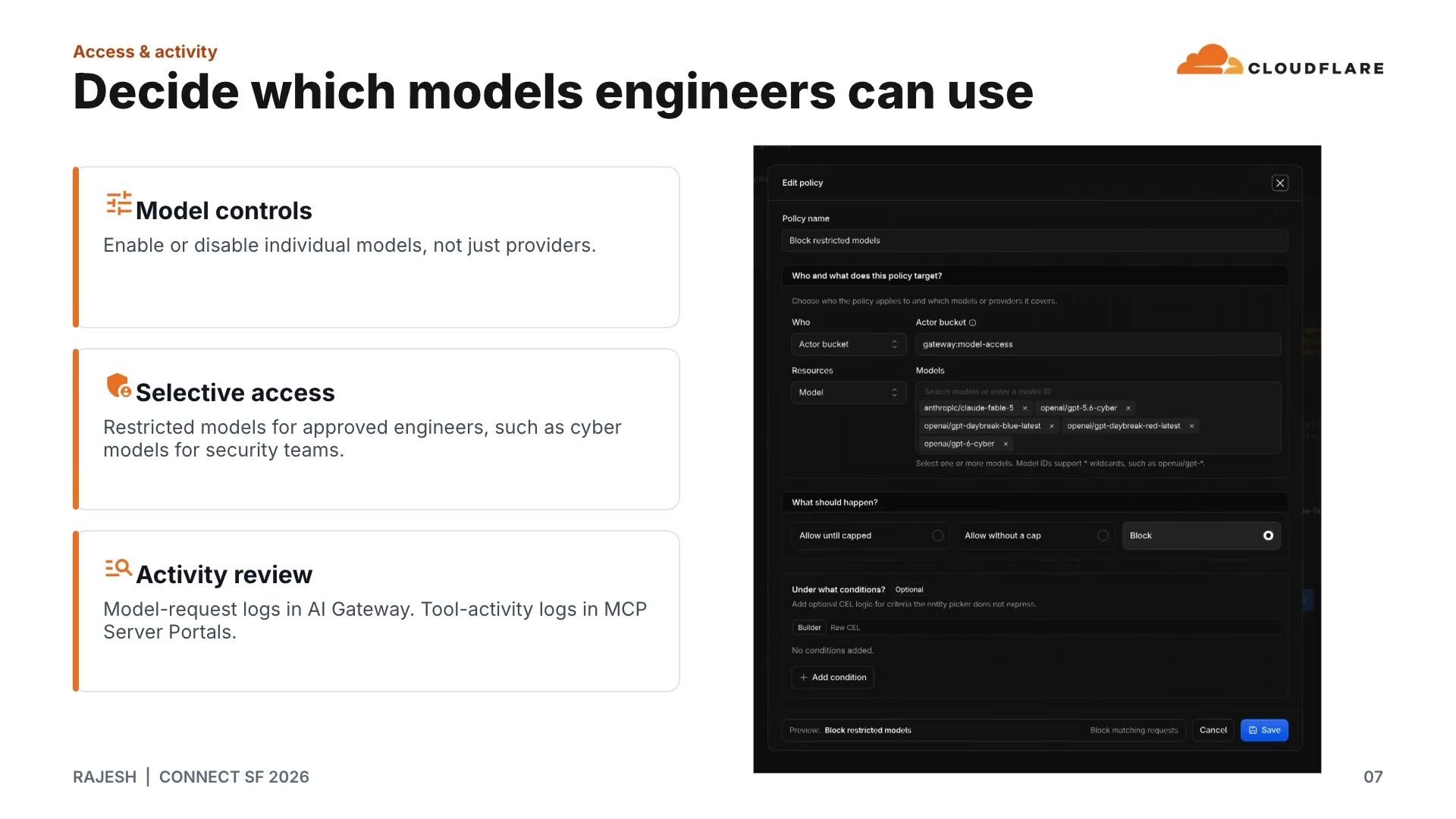
[6:33] It is for one of the code planning sessions and which model got used. So that's how this interaction is set up today. And then what that also helps us do is it does some model fits for us and tells us, is the model that you use for this task an overkill or not? And there are some numbers here that you will be able to see in the slides later when you get it, is that these are things that are happening in our... This is an actual production use case that we are kind of showing you right now. And these features are included with the AI gateway at no additional cost. This brings us to the next question, what can we control and what can we investigate? So you will see here that model access is more than picking up a provider.

[7:22] In the dashboard, you can turn models on or off. Some models might need a smaller audience. You can think of the cyber models that probably only need the security engineers that need to have access to that. And so it's a permission that we have to manage. Access, which is our Cloudflare product, gives us a lot of user policies and group policies, which helps us manage permissions. And then these policies then can get applied to the ecosystem that we have. It can get applied to the AI gateway. It can get applied to the MCP server portal. or to the workers' AI and workers' ecosystem as well. And there is also, when security or legal team wants to look into something, they have that record.

[8:08] They have request logs from the gateway, and they have tool activity logs from this MCP server portal that we support as well. With that, I'll hand it over to Scott. I went through the access and activity sections. He'll walk through the other. to areas, tools, and defaults, and cost. Over to you. Thanks, Rajesh. Appreciate it. So last year, our AI usage was growing a lot internally. We realized that we needed to set up people's harnesses for them. Security would ask us, like, why people's permissions weren't set up properly out of the box, or people would make typos in their configuration or mess up the JSON, and we'd have to fix it one by one in our support channels. So now, whenever employees log in with harness they do get access to the ai gateway like we just mentioned but also using the same logging command they get back centrally managed configuration and that just comes from a really simple worker that's behind the same access policy as the gateway so we're shipping a bunch of stuff to people we're shipping the default model they get what the system prompt is what company skills are there all of this comes down from that worker it also includes permissions so whatever our security team has said are the best practices for what harnesses what files they can read what intake. That's all set up by default.

[9:21] And we ship the MC portal URL so that engineers have that automatically set up in their harness. They don't have to read through any documentation or do anything. We don't just support open code. We support a bunch of different harnesses. And all of these harnesses, they bundle with a converter for configuration. So they read from the same centralized endpoint and convert it into the schema for the format that those harnesses expect. It's worth noting these are just default settings to get people started. Anything that's critical important. We're enforcing on the backend with AI Gateway, unlike with the clients where we have more limited control. But in our experience, setting people up with the right defaults goes a really long way to not just having a great developer experience, but also pushing people towards best practices in terms of security and cost. So at Cloudflare, we heavily use MCP to give our agents knowledge to our internal services, internal knowledge bases.

[10:09] And we use MCP portal from Cloudflare to do that. Single URL. that lets you manage all of your downstream MCP servers. Now, I see a portal lets you set up the servers with whatever access and authentication scheme you want, but for us, the typical pattern is to set these up using the underlying user's permissions. That way, we're not managing, trying to keep permissions in sync across multiple systems or exposing anything we don't want to. And when we add a new MCP server, which happens all the time internally, it just shows up for everyone who's allowed to use it. There's nothing else we need to do. We've more than doubled the number of MCP servers. that we're using in the company in the past six months. And then just speaking about MCP, why use MCP? You know, people talk about CLIs or skills or you just need bash with curl.

[10:56] We think MCP is a really great standard and it keeps getting better all the time. All the harnesses already know how to talk, speak it. And with the MCPortal, we get all the access and logging in the same place. Users sign in with Cloudflare Access and we see all their tool activity centrally. With CLIs, you need... to manage credentials on the laptop or you wouldn't have any central observability of what people are doing versus what their agents are doing. SP gives you that distinction. Really, the only challenge with this many MCPs traditionally is token bloat, which we'll come back to when we talk about code mode. So now that we covered tools and defaults, talk a little bit about cost management. So I imagine probably everyone in this room, maybe everyone in the building, I guess, is probably watching their token spend pretty closely. It's a hot topic. Cloudflare platform gives us.

[11:41] a ton of stuff that we can leverage to manage our cost without having to build a bunch of extra stuff as a really small platform team. And that includes budgets on AI Gateway. So internally, before the AI Gateway team had shipped spend limits, we were constantly checking AI spend every day. We would check top users. We would check trends. We'd reach out to them if something was off. And notably, besides just being really tedious and time-consuming for the team, we were catching issues after they'd already happened, not preventing them in the first place. The AI Gateway team sh- spend limits back in June. We've been using them since. We run a few different budgets in parallel. This is an example screenshot here. We run one budget for general models and we run a different one for the most expensive models as well. And what's really important here, while these budgets cover intentional usage of engineers on AI tools, even more important for me, like helping me sleep at night, is that we also cover accidental spend too.

[12:31] So like a runaway agent or some Ralph loop that someone forgot to terminate. that was running over the weekend or something like this. So now I'll talk about how we make this budget actually last longer with code mode. So as I mentioned earlier, the main downside to MCP traditionally is token usage. Every MCP server has a list of tools. Each has their definitions with parameters and what they return. And your agent has to send all of this to the LLM every single turn. So the LLM knows what tools it can call. So I just checked my agent this morning, actually. And I have 400 tools from 18 different servers. that i'm running now normally this would be like 120 000 tokens that i'm sending to the llm which would be completely unusable but mcportal code mode cuts this down to just two tools one to search and open api spec and then one to relevant the uh to execute the relevant tool calls and under the hood this is just the the agent searching the servers and tools writing a little bit of type script sending that up to a dynamic worker that's sandbox and isolated that worker doesn't have any credentials it just has the typed api object with all of the servers behind it. And code mode isn't just a benefit for cost.

[13:34] It's also a lot faster. Instead of having your agent or harness wait on multiple MCP calls one at a time, you can do things in parallel. It can fan out to a bunch of different servers, filter, transform the data, return that back in a single request. And the cost stays flat even as we add more and more and more and more MCP servers as well. So our current model default -wise at the company is GLM 5.3 Flash. It's a really great cheap model that is open weight and runs on workers AI. But we're also starting to really heavily use this new auto router that we just launched about a month ago. Like other models on the model routers in the market, classifies the task, figures out the right model to use in the hood and only picks from the models you've set up that you have policies and budgets for. Internally, we're seeing about 30 % savings using it.

[14:21] It's a new product and it keeps improving every day. But as it matures, I foresee that we'll. just have this as our default that everyone will use. So that's what the Cloudflare platform gives you in terms of controlling your AI cost. I'll pass it up to Rajesh to wrap things up.

[14:42] Thanks Scott. So this is what dogfooting showed us. You remember the six questions we asked in the earlier slide? We said answering them is a lot for a platform team like us to build, but because we were able to leverage products like access, AI gateway, MCP server portals, workers, workers AI, code mode. All this really came out of the box for us and this gave our team some leverage to invest in production agents instead and improving things like our AI code reviewer and basically handed the tough problems to the Cloudflare platform to solve. Let me now show you how we put all these pieces together.

[15:29] if it, that's it. If you take a picture of one slide, maybe make it this one. Cloudflare provides all these products and kind of helps us in building our AI engineering stack journey internally at Cloudflare. And so this is our recommended architecture that includes the clients. It includes the platform layer. The knowledge layer is where our back-to-end. and internal knowledge lives and the enforcement layer where we're trying to enforce policies at every endpoint, downstream permissions, budgets, and the tool logs.

[16:08] One thing we didn't also, Scott mentioned that we don't only use open code, we use other harnesses. How did we decide on which clients we should be supporting? So we used a checklist for that and there were three must pass gates. around identity and authorization, data governance and execution safety. But then if those gates did pass, we also evaluated against four other areas. The QR code will help you get to the checklist that we are leveraging internally in case it is for your interest, in case you're trying to also decide what clients you want to consider. And tools we support as a result internally is our homegrown Cloudflare, which is a VS code. extension. For CLI, we use OpenCode, Pi, Cloud, and Codex. And on the desktop apps, we use OpenCode, Cloud, Codex, and Devon as well.

[16:58] Thank you.

## Related sessions

- [Deploying a WAF vs. running a WAF program: The missing manual](https://www.cloudflare.com/connect/2026/session/deploying-a-waf-vs-running-a-waf-program-the-missing-manual)
- [Building an open agentic Internet: Discoverable, callable, and payable](https://www.cloudflare.com/connect/2026/session/building-an-open-agentic-internet-discoverable-callable-and-payable)
- [Turning data questions into data infra with the Cloudflare Data Platform](https://www.cloudflare.com/connect/2026/session/turning-data-questions-into-data-infra-with-cloudflare-basin)

## More from Connect

- [All sessions](https://www.cloudflare.com/connect/)
- [Get notified for Connect 2027](https://www.cloudflare.com/connect#2027)
