Web Performance & Frameworks
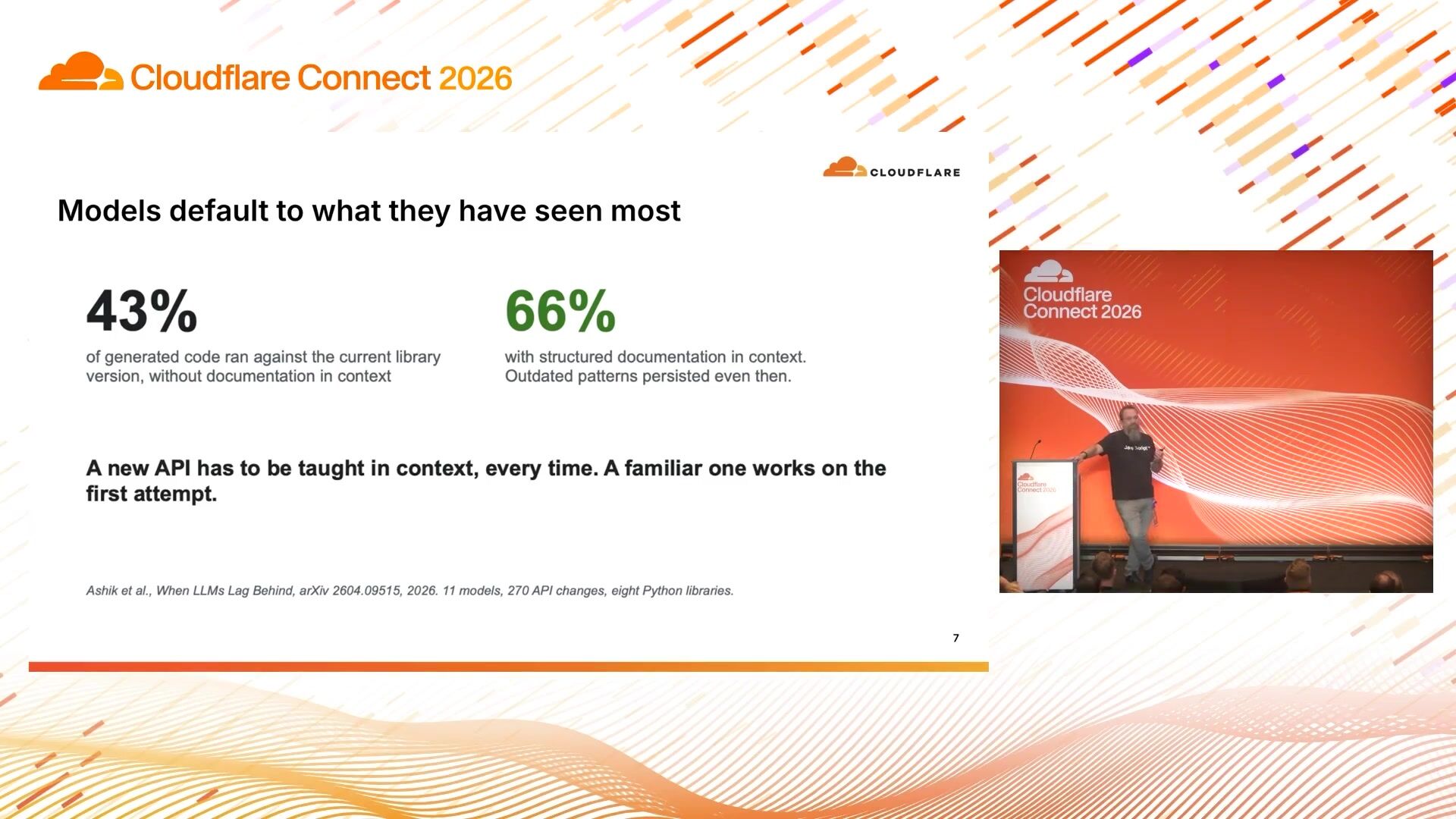
A runtime for developers and their agents

James Snell
Cloudflare
Late last year, we got a taste of what a personal AI agent can look like. You can give it access to your calendar, email, and to-do list and let the agent handle the boring tasks for you. The harness worked, until it didn’t. In this talk, I'll share the architecture of the harness I built for my personal agent that lives on the edge. You’ll get to see the harness that separates demo from production: sub-agents, memory, sandboxing, and human in the loop. Then, I'll share the real issues I ran into during development and the architectural decisions I made to overcome them.
0:02Hey everyone, thank you for being for the talk. I know it's also lunch going on but you all decided to be here so thank you so much for being here. Now my talk is going to be around my journey of building my own personal agent on Cloudflare. FYI, I work at Cloudflare, I work in the developer education team but I also do a lot of engineering. So the journey of my own personal agent started back in October when Kenton Werder, the chief architect of workers, gave a really interesting talk about like personal agent army. That made me wonder like when would be the time when I get to build my own personal agent that would do all the tasks that I hate myself.
0:48And then a few months later, not even a few months, like just a few weeks later, OpenClaw came out. It came out, I think, as Claude. if I'm not wrong, but it took the whole personally agent ecosystem by a storm. And it wasn't because there was a new model, but it because it had provided things that none of the products previously were able to do that. To give you an example, it worked wherever you were. So be it WhatsApp, be it Telegram, Signal, Discord, whatever. messaging platform you used, you could access OpenClaw over there. It would also remember you. So let's just say you asked it to find a restaurant and you gave it an address.
1:35It would know your preferences from that request and in a new session, if you ask it to find a restaurant again, OpenClaw knew what your preferences are and it would use those preferences from its memory and find you a new restaurant for that new location. and lastly it did tasks for you it wasn't just you asking a question and it replying back it did tasks for you so if you asked it to i don't know like file a bug on github it would go ahead and do that either use the tools that it already has or write a custom script to do that for you however when i was using this i kind of run into a couple of issues and this was like the early times of open claw when it was just launched so the team was shipping like updates almost every day which kept on breaking my agent and I was not happy with that I would like spend more time fixing my agent then the agent doing the work for me the other thing was it needed a computer running 24-7 no I don't want it to be that person who would like hold a laptop and run around that would be just hilarious if I did that in the city right so I needed a better solution And there was nothing in there that could do that for me.
2:53So I wanted an assistant. I got a second job of kind of a DevOps person where I was maintaining my assistant, like fixing every time there was a new change in there. And that wasn't a fun job at all. Now, before I talk about what I did and how I did it, let's take a step back and try to understand what exactly a harness is. Now... The early days of ChatGPT was you ask the model a question, the model would give you an answer. Fine enough, worked well, but wasn't really useful at that point of time. It was revolutionary, but did not do a lot of things. So a harness basically is a loop around that. A harness gives your model tools. It also gives your models the ability, not the model, but it also gives a runtime where you can save the messages that the user has.
3:44posted, and it would also reply back to the user at the end of the day. So it would basically run a tool call. The tool would execute, send back the result to the model. The model would decide if it's finished or not. And if it did not, it would follow that whole tool call loop again until it comes to a conclusion, and then send a reply back to the end user. So this is basically what an harness is, and this is what I needed for myself. Now, I started building this on Agent SDK. This was, I think, the 0 .04 of Agent SDK that I built my own Agent Harness. Again, I had to build it from scratch. I knew I wanted to deploy it on cloud because, A, I don't want a computer on 24-7.
4:33So it has to live on a cloud. Now, Agent Harness back then did not really had a Harness loop. what it gave you, all the parameters. And you, as an engineer, would have to build that whole loop. So it would have an onChat message handler, which would basically get triggered whenever you send a message. And behind the scenes, I would write a custom stream text, which is my own loop, where I would pass the tool calls and do all the processing myself. And this stream text method was roughly like 1,500 lines of code. I would define my own tools. I would. use the existing tools that are out there, stitch it into there. I would have the model in there. I would build a system prompt myself. I would also have a custom logic of pruning the messages, or in better terms, like doing a compaction on messages.
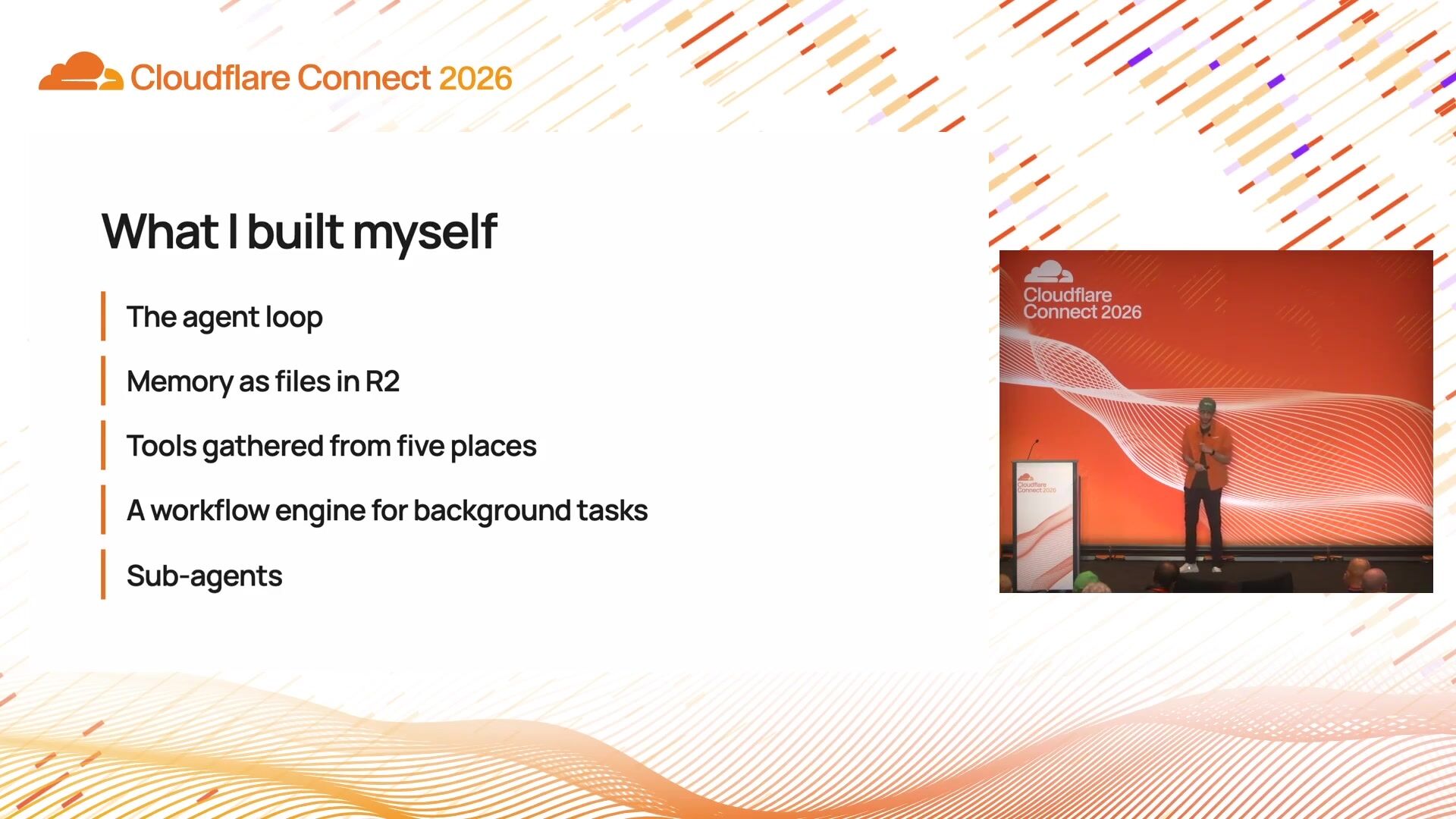
5:24And I also have to decide when the model should stop its turn after a particular step count. Again, worked fine back in the day, but it wasn't the most fun thing I had. Again, this was like 1,500 lines of code. I had to maintain myself. So what I had to really build, I had to build the whole agent loop or the harness loop for this. I had to decide how the memory lives. So I thought, hey, I have access to R2, which is the object storage. Let the agent write the memory to a file and store it to R2. I also had to gather tools from different places, stitch it in together in my agent loop. I wanted my agent to do things. on the background, and I was like, what would be the best way to do that? So I had to build a custom workflow engine on top of Cloudflare's workflows.
6:15If you don't know Cloudflare workflows, it is a static way of defining a step-by-step function that the workflow engine can execute behind the scenes. And this is way before we had dynamic workflows. So I had to define my own custom way of having dynamic workflows in that sense. Lastly, I was also experimenting a lot with sub-agents. So I had to build a sub-agent runner myself as well. So these were a lot of things, if you are building a harness yourself, you might want to look at. Agent loop, memory, how and when the agent gets the tools, maybe a workflow engine, and sub-agents as well. But I was like, what if there was something which would take everything away?
7:01Because again, I don't want to be the person maintaining the code all by myself. I was spending more time on building the agent than actually using the agent for my use cases. For me, I was lucky enough, Cloudflare came up with the answer, which was Project Think. Project Think is Cloudflare's own opinionated harness loop. It is very much inspired by Pi. And this was, again, very early. I think it was in April, where I got access to Project Thing, where we announced Project Thing. And I was one of the early adapters of Project Thing. So Project Thing gave me the agent loop. It had a way of saving the messages and resuming the streams, again, because it was built on top of agent's SDK. It gave access to tools like files.
7:47So I did not really have to have my custom memory tools for writing the files. In 2R2, everything came out of the box for me. And it also came to me, and it also came to me. with a really interesting concept of context blocks. Now, I can have different context blocks for different use cases. So I had a context block where it defined or it told my agent, hey, this is the block where you should be saving all the memory for this particular user. I had a context block for the agent's own identity. So the context block helped me define how my agent would do a particular thing. And it also came with helper methods for compaction. And it also gave me tools out of the box to run serve agents and extensions. So I had everything by default come with Project Thing.
8:35So this was the agent loop that I had stitched myself. But with Project Thing, it switched away in a more idiomatic way. Now I had to just think about, all right, what model I want to use with my agent, what tools my agent can have. and then what context blocks my agent really needs. That's all I had to do. So instead of like having those 1500 lines of code, it was just a few hundred lines of code now for my agent.
9:06So this was again back when I was working on Agent Claw. I got highly inspired by Open Claw, so I was calling it Agent Claw, but I wasn't really happy with that project. It was a lot of migration, the code looked ugly, and I wasn't like, all right, I need... to start something fresh. So I started a new project called Yukt, which from day one is built on Think. So it uses everything that Think provides. And if there is something that Think does not provide, but is available maybe in the Agents SDK package or on an external package, I could easily stitch in with Now, I'm going to walk through a couple of things that I had to, again, do manually with Think. And it also evolved. with the changes the package is shipped. So the first thing was the chat. Now how do I define what are how I how I'm gonna like define the chat interface or chat session for a user?
10:02Should each user have a separate chat session? Should a chat session be separated from each other? I wasn't really sure like what would be the best way to do that. So initially I started with like router which would basically be a durable object which would create a list of all the sessions a user would have and a durable object our user would have just one single durable object which would contain all the chat sessions so if I if a user was switching between sessions I used to basically have a pointer which would point which is the current session and swap accordingly this wasn't the best experience because there was a lot of overlap happening I would send a message in one chat session but it would appear in a different chat session and it wasn't like a really good experience for the user at the end of the day the good thing was I think like just a few weeks back the agent SDK team shipped a routing default with the agent SDK so now you have a routing agent or like think of it like a separate durable object which would be taking care of that log of which chat sessions the user has, and you don't really need to worry about anything.
11:17You don't really need to also worry about how do you route to that particular chat session now. The routing agent would take care of that. And the SQL statement that you see is something I'm really happy about, because that was dropping my custom depil. I don't need it anymore. No custom code. I can use what the SDK provides out of the box. So if you are building again on the agent SDK, you might want to look at this. architecture because you often want to have a mechanism where you would store an index or a registry of all the chat sessions your users are having. The next one was the tools. Now for my agent to actually do the work that I wanted to do I needed to give tools and again previously I had to stitch the tools myself. Not fun at all and I think that was the time also when code mode was introduced so I had to plug kind of my own custom implementation of code mode so I would take the tools that I had would run a for loop for that and then let it handle that for me so again this is like the most ugliest way of doing a code tool because the number of tools that grows it would break if I added a new tool and I did not follow the standard that I had defined for my agent this loop would break which meant that I had to again maintain this particular loop We shipped code mode in the runtime as a package, so what I had to do was simply define the code mode over here, give it the access to a dynamic worker, and
12:50now my tools can use the code mode runtime by itself so that I don't have to stitch all those things by myself. The next thing I was also able to do with that is have a human-in-the-loop flow. I am very skeptical of my agent. doing any kind of right things so if I am even asking them to like add a event to my calendar or let's just say just write an email I want to have a look what the agent is doing before it actually does any kind of a right access or even like delete event in there with this I was able to have that approval flow so whenever my agent was trying to access something which they are not allowed to they would send up an approval request to me like hey I need approval for this, and unless and until I give that approval, my agent would not be able to do that.
13:39The other thing I added in here was an approval timeout, so that if I don't approve it within five minutes, my agent would take it as a rejection, and then maybe ask me again, prompt me again to approve that, or just skip that and think about another way of achieving that task, or just be like, all right, the user hasn't given me the approval. Maybe... they don't really want me to do the task. So with each release that came out with the agent's SDK, with Think, I was able to delete a work around all the time. And today, I am trying to figure out a crucial question. Should I still use Think or should I go with Pi on durable objects? If you are aware about Pi, Pi is a coding agent or a coding harness, which recently came up.
14:30with PyDurable, which means that you can now natively run Py on Cloudflare. And it gives you a lot of things out of the box. Think is inspired by Py. You can use Think if you want. to have more customization, you can deploy Py. I know OpenCode, the version 2 of OpenCode, is also compatible natively on durable objects. So you can deploy that as well. And we have another framework called Flu. Now, when I talk to people about these different frameworks, they often ask me, all right, you have so many options at Cloudflare to building and deploying agents. How do I know which one to use? And my take on this is, how much customization do you really want to have in your agent?
15:18Do you really want to have a full customization for your agent? Go with Agent SDK. It gives you all the building blocks. Use that. to stitch whatever you want and that's the best for you. If you want an opinionated harness that is built on top of Agent SDK, think is the framework for that. If you love Pi and if you want to have all the features that Pi ships out of the box, like a tree, so Pi has a mechanism of starting a session from like any of the checkpoints that you have, if you want to have a forking as well, you can use Pi for that. OpenCode if you want to use OpenCode, and for me, OpenCode is more on the coding side. So if you're building more of a coding agent, OpenCode, you can use that as well.
16:03And if you're building something very custom, you're familiar with React ecosystem, you want to have a dynamic way for your agent to get access to the tools, a dynamic way for selecting which model your agent should have, use Flue. Another interesting thing with Flue is you can kind of run that. agent via CLI, because Flu comes with that as well. So you're not tied to just deploying it on Cloudflare. You can run it maybe in a GitHub action as well. So if you have those kind of use cases, I believe Flu is the best approach. Now again, these are my opinions on these frameworks. But you should be playing around with them and seeing which one works best for you. To give you a quick recap on the architecture today, So I have different interfaces where my user can interact with Yook.
16:55There is a web application that the user can sign in and have their own personal agent over there. I have a mobile application built with React Native, and I wanted that experience for myself. So there's that. And I have also given Yook its own email address. So if I want to send in an email and ask you to process something, Yook can do that for me as well. And again, as I mentioned, there is a router agent which basically contains the index of all the sessions that I have with Yook. And then, based on that particular session, I can go into that particular session and talk with Yook. Yook also has access to agent memory. This is something we have in beta at Cloudflare, which you can hook it into your particular agent so your agent remembers who you are and the next time it needs to perform a similar action.
17:46it can go ahead and do that. And because it is using Agents SDK under the hood, I can have schedules in Yook so that you can go ahead and schedule and check whatever it needs to do for that. I'm connecting external services using MCP, and it has access to browser run. So if I want Yook to go ahead and use a website, it can use browser run for that. I have a few seconds, so I'm going to try and show a quick few demos that I have. So this is something I had. I think I did it on Sunday itself. So I asked you, hey, I am traveling to SF. I am going to be jet lagged. Find me a way of how to fight this jet lag. So it went into my calendar, found out my flight details, and added things that I should be doing on my flight, when I should be sleeping, when I should be having a coffee and stuff like that.
18:40And it could not figure out my return flight, wasn't in my calendar apparently so you automatically scheduled a task to check this today itself like hey I'm gonna check it on Wednesday at 11 o 'clock to see if that light detail is in your calendar apparently I forgot to add it to my calendar so you so you does not have access to that but that is something on my side there's another example that I have let me try to play the video over here
19:11I'm not sure if it's going to play with that. All right, let's see.
19:18So no problem.
19:23Come on. Anyways, OK, I have another video that I can pull up real quick, which is where I am basically using my agent to ask for a restaurant in San Francisco. because I was meeting a couple of friends. So I was like, hey, find me a restaurant in San Francisco that I can go and hang out with my friends. So let me zoom this in. And over here, I am asking it to go find out some restaurants. It goes in. It does a bit of thinking. It tries to figure out the restaurant. It's going to do web search in there. So if you see, this is basically the web search that it does. It is now reasoning around it. And it is. going to use the browser in there.
20:10So it is now trying to book a table using OpenTable. For me, I did not went ahead through the whole process of booking a table because I wanted to make sure it is a good restaurant and my friend is going to enjoy eating over there. So I haven't done the whole process, but just to show you the capability of what the agent has today. So this is what you can do today. Trying to go back to my slides.
20:41all right so I started with building a lot of things that were kind of not really available with the SDK but with the new features and new things that were shipped with the SDK I was able to delete a lot of those things which was fun for me because I had like a less of a maintenance to do and more of like usage and I can actually like start asking my agent do stuff for me I also wanted to like show you it on my mobile app but for some reason I'm not able to connect it to it but if you want to like you know talk more about agent harnesses or how I am building my personal agent feel free to find me in the speaker lounge which is at level 2 Alcov 1 I'm gonna be hanging around that happy to answer any questions for that and if you don't find me with that I am over here throughout the conference me and I'll be happy to talk around that.
21:31And one last thing, do let us know how you find this session. I've tried to discover the architecture and I'll give you an overview, but if you want to learn more in the technical depth of it, your feedback will help me learn that and hopefully the next time I can go in more depth for that. Thank you so much.
James Snell
Cloudflare
Maxwell Brown
Effectful Technologies, Inc
Matt Kane
Cloudflare
Be the first to know when registration opens and the agenda goes live.
---
title: "From chaos to control: Building a harness for personal agents"
url: "https://www.cloudflare.com/connect/2026/session/from-chaos-to-control-building-a-harness-for-personal-agents"
year: 2026
---

# From chaos to control: Building a harness for personal agents

[Watch session](https://www.cloudflare.com/connect/2026/session/from-chaos-to-control-building-a-harness-for-personal-agents)

## Session details

- **Track:** Web Performance & Frameworks
- **Topics:** Agentic AI & MCP, Emerging tech & post-quantum
- **Solution areas:** Developer Platform

## About this session

Late last year, we got a taste of what a personal AI agent can look like. You can give it access to your calendar, email, and to-do list and let the agent handle the boring tasks for you. The harness worked, until it didn’t. In this talk, I'll share the architecture of the harness I built for my personal agent that lives on the edge. You’ll get to see the harness that separates demo from production: sub-agents, memory, sandboxing, and human in the loop. Then, I'll share the real issues I ran into during development and the architectural decisions I made to overcome them.

## Speakers

- [Harshil Agrawal](https://www.cloudflare.com/connect/speakers/2421465) — Senior Developer Educator, Cloudflare

## Transcript

[0:02] Hey everyone, thank you for being for the talk. I know it's also lunch going on but you all decided to be here so thank you so much for being here. Now my talk is going to be around my journey of building my own personal agent on Cloudflare. FYI, I work at Cloudflare, I work in the developer education team but I also do a lot of engineering. So the journey of my own personal agent started back in October when Kenton Werder, the chief architect of workers, gave a really interesting talk about like personal agent army. That made me wonder like when would be the time when I get to build my own personal agent that would do all the tasks that I hate myself.

[0:48] And then a few months later, not even a few months, like just a few weeks later, OpenClaw came out. It came out, I think, as Claude. if I'm not wrong, but it took the whole personally agent ecosystem by a storm. And it wasn't because there was a new model, but it because it had provided things that none of the products previously were able to do that. To give you an example, it worked wherever you were. So be it WhatsApp, be it Telegram, Signal, Discord, whatever. messaging platform you used, you could access OpenClaw over there. It would also remember you. So let's just say you asked it to find a restaurant and you gave it an address.

[1:35] It would know your preferences from that request and in a new session, if you ask it to find a restaurant again, OpenClaw knew what your preferences are and it would use those preferences from its memory and find you a new restaurant for that new location. and lastly it did tasks for you it wasn't just you asking a question and it replying back it did tasks for you so if you asked it to i don't know like file a bug on github it would go ahead and do that either use the tools that it already has or write a custom script to do that for you however when i was using this i kind of run into a couple of issues and this was like the early times of open claw when it was just launched so the team was shipping like updates almost every day which kept on breaking my agent and I was not happy with that I would like spend more time fixing my agent then the agent doing the work for me the other thing was it needed a computer running 24-7 no I don't want it to be that person who would like hold a laptop and run around that would be just hilarious if I did that in the city right so I needed a better solution And there was nothing in there that could do that for me.

[2:53] So I wanted an assistant. I got a second job of kind of a DevOps person where I was maintaining my assistant, like fixing every time there was a new change in there. And that wasn't a fun job at all. Now, before I talk about what I did and how I did it, let's take a step back and try to understand what exactly a harness is. Now... The early days of ChatGPT was you ask the model a question, the model would give you an answer. Fine enough, worked well, but wasn't really useful at that point of time. It was revolutionary, but did not do a lot of things. So a harness basically is a loop around that. A harness gives your model tools. It also gives your models the ability, not the model, but it also gives a runtime where you can save the messages that the user has.

[3:44] posted, and it would also reply back to the user at the end of the day. So it would basically run a tool call. The tool would execute, send back the result to the model. The model would decide if it's finished or not. And if it did not, it would follow that whole tool call loop again until it comes to a conclusion, and then send a reply back to the end user. So this is basically what an harness is, and this is what I needed for myself. Now, I started building this on Agent SDK. This was, I think, the 0 .04 of Agent SDK that I built my own Agent Harness. Again, I had to build it from scratch. I knew I wanted to deploy it on cloud because, A, I don't want a computer on 24-7.

[4:33] So it has to live on a cloud. Now, Agent Harness back then did not really had a Harness loop. what it gave you, all the parameters. And you, as an engineer, would have to build that whole loop. So it would have an onChat message handler, which would basically get triggered whenever you send a message. And behind the scenes, I would write a custom stream text, which is my own loop, where I would pass the tool calls and do all the processing myself. And this stream text method was roughly like 1,500 lines of code. I would define my own tools. I would. use the existing tools that are out there, stitch it into there. I would have the model in there. I would build a system prompt myself. I would also have a custom logic of pruning the messages, or in better terms, like doing a compaction on messages.

[5:24] And I also have to decide when the model should stop its turn after a particular step count. Again, worked fine back in the day, but it wasn't the most fun thing I had. Again, this was like 1,500 lines of code. I had to maintain myself. So what I had to really build, I had to build the whole agent loop or the harness loop for this. I had to decide how the memory lives. So I thought, hey, I have access to R2, which is the object storage. Let the agent write the memory to a file and store it to R2. I also had to gather tools from different places, stitch it in together in my agent loop. I wanted my agent to do things. on the background, and I was like, what would be the best way to do that? So I had to build a custom workflow engine on top of Cloudflare's workflows.

[6:15] If you don't know Cloudflare workflows, it is a static way of defining a step-by-step function that the workflow engine can execute behind the scenes. And this is way before we had dynamic workflows. So I had to define my own custom way of having dynamic workflows in that sense. Lastly, I was also experimenting a lot with sub-agents. So I had to build a sub-agent runner myself as well. So these were a lot of things, if you are building a harness yourself, you might want to look at. Agent loop, memory, how and when the agent gets the tools, maybe a workflow engine, and sub-agents as well. But I was like, what if there was something which would take everything away?

[7:01] Because again, I don't want to be the person maintaining the code all by myself. I was spending more time on building the agent than actually using the agent for my use cases. For me, I was lucky enough, Cloudflare came up with the answer, which was Project Think. Project Think is Cloudflare's own opinionated harness loop. It is very much inspired by Pi. And this was, again, very early. I think it was in April, where I got access to Project Thing, where we announced Project Thing. And I was one of the early adapters of Project Thing. So Project Thing gave me the agent loop. It had a way of saving the messages and resuming the streams, again, because it was built on top of agent's SDK. It gave access to tools like files.

[7:47] So I did not really have to have my custom memory tools for writing the files. In 2R2, everything came out of the box for me. And it also came to me, and it also came to me. with a really interesting concept of context blocks. Now, I can have different context blocks for different use cases. So I had a context block where it defined or it told my agent, hey, this is the block where you should be saving all the memory for this particular user. I had a context block for the agent's own identity. So the context block helped me define how my agent would do a particular thing. And it also came with helper methods for compaction. And it also gave me tools out of the box to run serve agents and extensions. So I had everything by default come with Project Thing.

[8:35] So this was the agent loop that I had stitched myself. But with Project Thing, it switched away in a more idiomatic way. Now I had to just think about, all right, what model I want to use with my agent, what tools my agent can have. and then what context blocks my agent really needs. That's all I had to do. So instead of like having those 1500 lines of code, it was just a few hundred lines of code now for my agent.

[9:06] So this was again back when I was working on Agent Claw. I got highly inspired by Open Claw, so I was calling it Agent Claw, but I wasn't really happy with that project. It was a lot of migration, the code looked ugly, and I wasn't like, all right, I need... to start something fresh. So I started a new project called Yukt, which from day one is built on Think. So it uses everything that Think provides. And if there is something that Think does not provide, but is available maybe in the Agents SDK package or on an external package, I could easily stitch in with Now, I'm going to walk through a couple of things that I had to, again, do manually with Think. And it also evolved. with the changes the package is shipped. So the first thing was the chat. Now how do I define what are how I how I'm gonna like define the chat interface or chat session for a user?

[10:02] Should each user have a separate chat session? Should a chat session be separated from each other? I wasn't really sure like what would be the best way to do that. So initially I started with like router which would basically be a durable object which would create a list of all the sessions a user would have and a durable object our user would have just one single durable object which would contain all the chat sessions so if I if a user was switching between sessions I used to basically have a pointer which would point which is the current session and swap accordingly this wasn't the best experience because there was a lot of overlap happening I would send a message in one chat session but it would appear in a different chat session and it wasn't like a really good experience for the user at the end of the day the good thing was I think like just a few weeks back the agent SDK team shipped a routing default with the agent SDK so now you have a routing agent or like think of it like a separate durable object which would be taking care of that log of which chat sessions the user has, and you don't really need to worry about anything.

[11:17] You don't really need to also worry about how do you route to that particular chat session now. The routing agent would take care of that. And the SQL statement that you see is something I'm really happy about, because that was dropping my custom depil. I don't need it anymore. No custom code. I can use what the SDK provides out of the box. So if you are building again on the agent SDK, you might want to look at this. architecture because you often want to have a mechanism where you would store an index or a registry of all the chat sessions your users are having. The next one was the tools. Now for my agent to actually do the work that I wanted to do I needed to give tools and again previously I had to stitch the tools myself. Not fun at all and I think that was the time also when code mode was introduced so I had to plug kind of my own custom implementation of code mode so I would take the tools that I had would run a for loop for that and then let it handle that for me so again this is like the most ugliest way of doing a code tool because the number of tools that grows it would break if I added a new tool and I did not follow the standard that I had defined for my agent this loop would break which meant that I had to again maintain this particular loop We shipped code mode in the runtime as a package, so what I had to do was simply define the code mode over here, give it the access to a dynamic worker, and

[12:50] now my tools can use the code mode runtime by itself so that I don't have to stitch all those things by myself. The next thing I was also able to do with that is have a human-in-the-loop flow. I am very skeptical of my agent. doing any kind of right things so if I am even asking them to like add a event to my calendar or let's just say just write an email I want to have a look what the agent is doing before it actually does any kind of a right access or even like delete event in there with this I was able to have that approval flow so whenever my agent was trying to access something which they are not allowed to they would send up an approval request to me like hey I need approval for this, and unless and until I give that approval, my agent would not be able to do that.

[13:39] The other thing I added in here was an approval timeout, so that if I don't approve it within five minutes, my agent would take it as a rejection, and then maybe ask me again, prompt me again to approve that, or just skip that and think about another way of achieving that task, or just be like, all right, the user hasn't given me the approval. Maybe... they don't really want me to do the task. So with each release that came out with the agent's SDK, with Think, I was able to delete a work around all the time. And today, I am trying to figure out a crucial question. Should I still use Think or should I go with Pi on durable objects? If you are aware about Pi, Pi is a coding agent or a coding harness, which recently came up.

[14:30] with PyDurable, which means that you can now natively run Py on Cloudflare. And it gives you a lot of things out of the box. Think is inspired by Py. You can use Think if you want. to have more customization, you can deploy Py. I know OpenCode, the version 2 of OpenCode, is also compatible natively on durable objects. So you can deploy that as well. And we have another framework called Flu. Now, when I talk to people about these different frameworks, they often ask me, all right, you have so many options at Cloudflare to building and deploying agents. How do I know which one to use? And my take on this is, how much customization do you really want to have in your agent?

[15:18] Do you really want to have a full customization for your agent? Go with Agent SDK. It gives you all the building blocks. Use that. to stitch whatever you want and that's the best for you. If you want an opinionated harness that is built on top of Agent SDK, think is the framework for that. If you love Pi and if you want to have all the features that Pi ships out of the box, like a tree, so Pi has a mechanism of starting a session from like any of the checkpoints that you have, if you want to have a forking as well, you can use Pi for that. OpenCode if you want to use OpenCode, and for me, OpenCode is more on the coding side. So if you're building more of a coding agent, OpenCode, you can use that as well.

[16:03] And if you're building something very custom, you're familiar with React ecosystem, you want to have a dynamic way for your agent to get access to the tools, a dynamic way for selecting which model your agent should have, use Flue. Another interesting thing with Flue is you can kind of run that. agent via CLI, because Flu comes with that as well. So you're not tied to just deploying it on Cloudflare. You can run it maybe in a GitHub action as well. So if you have those kind of use cases, I believe Flu is the best approach. Now again, these are my opinions on these frameworks. But you should be playing around with them and seeing which one works best for you. To give you a quick recap on the architecture today, So I have different interfaces where my user can interact with Yook.

[16:55] There is a web application that the user can sign in and have their own personal agent over there. I have a mobile application built with React Native, and I wanted that experience for myself. So there's that. And I have also given Yook its own email address. So if I want to send in an email and ask you to process something, Yook can do that for me as well. And again, as I mentioned, there is a router agent which basically contains the index of all the sessions that I have with Yook. And then, based on that particular session, I can go into that particular session and talk with Yook. Yook also has access to agent memory. This is something we have in beta at Cloudflare, which you can hook it into your particular agent so your agent remembers who you are and the next time it needs to perform a similar action.

[17:46] it can go ahead and do that. And because it is using Agents SDK under the hood, I can have schedules in Yook so that you can go ahead and schedule and check whatever it needs to do for that. I'm connecting external services using MCP, and it has access to browser run. So if I want Yook to go ahead and use a website, it can use browser run for that. I have a few seconds, so I'm going to try and show a quick few demos that I have. So this is something I had. I think I did it on Sunday itself. So I asked you, hey, I am traveling to SF. I am going to be jet lagged. Find me a way of how to fight this jet lag. So it went into my calendar, found out my flight details, and added things that I should be doing on my flight, when I should be sleeping, when I should be having a coffee and stuff like that.

[18:40] And it could not figure out my return flight, wasn't in my calendar apparently so you automatically scheduled a task to check this today itself like hey I'm gonna check it on Wednesday at 11 o 'clock to see if that light detail is in your calendar apparently I forgot to add it to my calendar so you so you does not have access to that but that is something on my side there's another example that I have let me try to play the video over here

[19:11] I'm not sure if it's going to play with that. All right, let's see.

[19:18] So no problem.

[19:23] Come on. Anyways, OK, I have another video that I can pull up real quick, which is where I am basically using my agent to ask for a restaurant in San Francisco. because I was meeting a couple of friends. So I was like, hey, find me a restaurant in San Francisco that I can go and hang out with my friends. So let me zoom this in. And over here, I am asking it to go find out some restaurants. It goes in. It does a bit of thinking. It tries to figure out the restaurant. It's going to do web search in there. So if you see, this is basically the web search that it does. It is now reasoning around it. And it is. going to use the browser in there.

[20:10] So it is now trying to book a table using OpenTable. For me, I did not went ahead through the whole process of booking a table because I wanted to make sure it is a good restaurant and my friend is going to enjoy eating over there. So I haven't done the whole process, but just to show you the capability of what the agent has today. So this is what you can do today. Trying to go back to my slides.

[20:41] all right so I started with building a lot of things that were kind of not really available with the SDK but with the new features and new things that were shipped with the SDK I was able to delete a lot of those things which was fun for me because I had like a less of a maintenance to do and more of like usage and I can actually like start asking my agent do stuff for me I also wanted to like show you it on my mobile app but for some reason I'm not able to connect it to it but if you want to like you know talk more about agent harnesses or how I am building my personal agent feel free to find me in the speaker lounge which is at level 2 Alcov 1 I'm gonna be hanging around that happy to answer any questions for that and if you don't find me with that I am over here throughout the conference me and I'll be happy to talk around that.

[21:31] And one last thing, do let us know how you find this session. I've tried to discover the architecture and I'll give you an overview, but if you want to learn more in the technical depth of it, your feedback will help me learn that and hopefully the next time I can go in more depth for that. Thank you so much.

## Related sessions

- [A runtime for developers and their agents](https://www.cloudflare.com/connect/2026/session/a-runtime-for-developers-and-their-agents)
- [Durable AI workflows with Effect: Maintaining open source at scale](https://www.cloudflare.com/connect/2026/session/durable-ai-workflows-with-effect-maintaining-open-source-at-scale)
- [EmDash: The secure WordPress successor for humans and agents](https://www.cloudflare.com/connect/2026/session/emdash-the-secure-wordpress-successor-for-humans-and-agents)

## More from Connect

- [All sessions](https://www.cloudflare.com/connect/)
- [Get notified for Connect 2027](https://www.cloudflare.com/connect#2027)

