Secure AI
After human: How to think about fraud & abuse when anyone could be anything

Bryan Becker
Cloudflare
0:03My name is Kenny Johnson. I'm a product manager on the Cloudflare Zero Trust team. I oversee access, MCP portals, and a couple of other products. I'm joined by Ayush, who's on our internal infrastructure engineering team. I think it's the right name for the team. We're really excited today to talk to you guys about what we're doing with internal MCP security at Cloudflare, and hopefully trade some notes for you all to take back and both use Cloudflare products. well as just generally find a good approach to securing your MCPs. We'll start off with a quick question. Do you guys know every system that your agency use can access? Raise a hand. Yeah, great. Exactly. And then even extrapolating that further, think about your employees and your team and their systems and all the things that they're trying out. Again, probably not going to see a lot of hands here. We are working towards that goal though.
0:50And that's a big piece that we're really having a lot of luck with internally at Cloudflare by leveraging MCPs and really pushing MCPs as the primary standard. The things that we're really trying to avoid are things like direct API keys, custom scripts, home -rolled CLI tools, you name it, we've seen it all. I'm guessing you guys are also seeing that. The challenge is even agents suggest that. They try to break out of the boxes that they're being put in. So we're really focused on trying to build a standard protocol and create a page. path for the team to be able to get access to all of the independent systems that they're looking to access. So if we're going with our house analogy, we think about MCP as the door and the gateway into independent systems for code, tickets, internal APIs, docs.
1:40And we've actually really focused on building and developing our own MCPs, even when third -party MCPs are available. Generally, we're building them ourselves. I wouldn't necessarily recommend that for every organization, but it has been really nice for us to be able to home roll them and actually have a really direct control, both at the MCP server, as well as at the gateway level. And the big thing to ask yourself or that we ask ourselves is for which user, for which tool, under which security policy is it gonna trigger, at what context cost? And we'll talk a little bit more about that. We ran into some really interesting challenges with context windows to start. And then what's going to be the scope of the impact of the action that the particular user is taking? So this is the framework that we've taken with Ayesha's team as they've built and rolled out MCPs internally.
2:32This is becoming really cheap to add. You can go to the hardware store and go buy more and more doors. It's been really, really rapid in terms of MCP adoption internally at Cloudflare. It started off really slow. I think this slide's actually probably out of date. I'm guessing Ayesha and team. have probably shipped more since we've been here in San Francisco. So this brought us to one of our first big challenges that we ran into. That's a lot of tools. And if you take something like an MCP Gateway and you push all of those tools to a context of an agent session, all of a sudden it's going to tip over. We had people running into situations where you could ask, what's the temperature outside? And your context would shoot up to 100,000 tokens. So we knew we had to come up with a way to improve this.
3:20So yeah, like I was saying, we'd see like 35,000 tokens on the first request. It was a really high time to actually get a response because the agent was just chunking through tool calls or tool names and lists and descriptions that really didn't matter for its independent task. And we ran into problems where just the context window was expiring and we were hitting compactions way too early. a user's work stream. And then we ran into the, because we rolled our own MCP servers for all of our independent applications, and we have lots of smart people at Cloudflare, everybody tried to independently optimize for this. So every single MCP server that was being developed was coming up with a different solution or approach. And this is actually where we landed on a very cool approach called code mode, which basically allows you to reveal a handful.
4:12of tool calls to your agent and then it instructs the agent to write javascript and go and find and fetch the correct tool and then use a tool to go and fetch that particular tool uh the problem is we were doing that at each individual uh mcp um so i'll let aish talk a little bit about how we kind of up leveled that and uh improved it yeah so oh can we get aisha's mic can we get aisha's mic
4:41Track are you good? No, no, no I look okay, but I
4:50Can we get the slides back?
4:54Look don't open so switch. Can you talk talk to me?
5:00Yeah, just talk a lot. You're good. What did I get you back?
5:08Hello. Oh, there we go. So, yeah. We started adding CodeMod to our servers, but the problem was, so CodeMod has two tools, search and execute. Search is basically where we file the tool and search for a tool, and execute is when we actually, not the model actually writes the script and calls the tool. But the problem is, we only get search and execute on the portal, so... there's no tool level visibility there with us and portal allows us to switch off or on tools at the portal which admins can do and that was taken away if we did that. Plus all the logs will say search and execute not the actual tool call. So this never worked. And that's why we wanted just one place where we can add all this without us having to do that at every server.
6:04So we added this portal was the right place for us. And yeah, then we added it there.
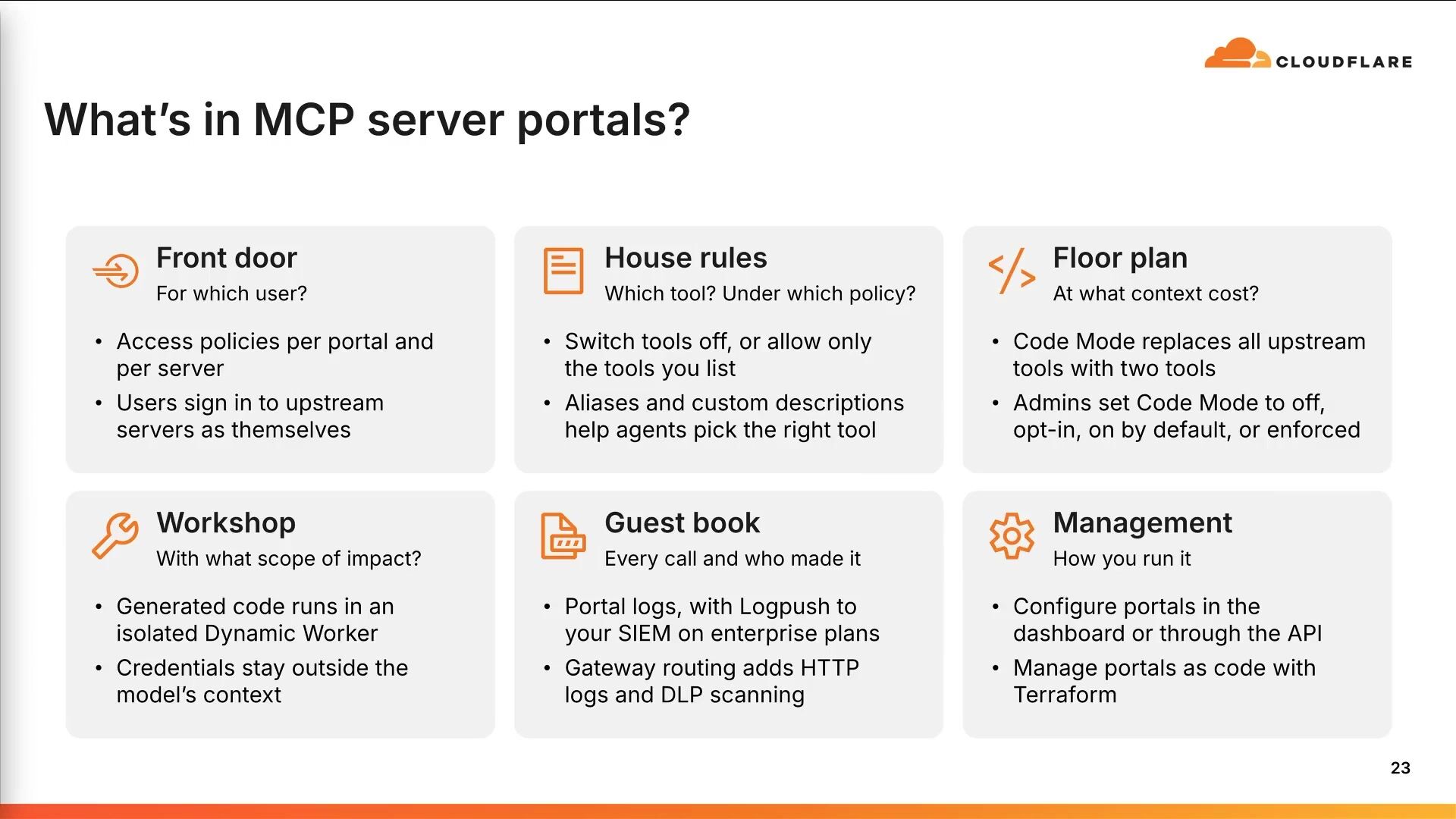
6:14Yeah, and that's a big thing that we've seen is centralizing these tools. And that's a big thing that my team worked really closely with Ayush's team. A lot of the controls that we put in place into our MCP gateway MCP portals came out of working with his team that, for example, we can take code mode and you can, as an admin, either decide to force it on for everybody. You can set it up so that it's an optional flag. You either opt it in or opt it out, or you can turn it off if there's specific situations. So then taking the house analogy, what this ends up looking like, we use Cloudflare Access as our front door. You definitely don't have to do that. There's no prerequisite to doing that. You can use your identity provider or a different reverse proxy if you have that. Then we create the house rules, basically. That's using MCP portals. We can turn on and off independent tool.
7:01calls. So there's a specific situation where we want to not allow specific tools to be made available to subsets of users. We can do that at the portal level. Code mode then allows us to actually execute. And we've seen a 93 % reduction in tokens with code mode. Saw some people taking photos of that. So we've seen a massive, massive payoff on that. And then we've got it set up and built so that the MCP execution is sandboxed completely. so it can't go and reach to other APIs or anything like that. So this is really the framework that we try to take when we're building our MCP servers and then on-ramping them into the portal. One other piece I'll call out here is that we've done this fully via infrastructure as code. So we've got this set up within the Terraform provider.
7:47And it's actually a really nice way for a developer to say, hey, I want to build an MCP server and I want to publish it. And there's a really standardized approach so that Iush and team get... notification in GitLab when a new merge request is open to add an MCP server. And that's a really good trigger point to allow them to review and vet for security and make sure there's no issues. And then they can publish it to the portal, which then allows employees to discover an MCP. You don't have to go add every single individual MCP to your configuration. And then we've got our guest book in terms of logging and DLP controls. You can route everything through the MCP gateway. through Cloudflare Secure Web Gateway, which allows you to do HTTP-level policies so you can inspect and run specific data loss prevention controls, as well as just, like, if you need to have to respect your egress policies for your firewall, you can do that.
8:40And then we've been really focused on locking down access to basically rogue MCPs or direct API keys or CLIs. And we can do that via access, as well as we recently added a feature into Gateway. the gateway PM in here, that allows you to select on -ramps within gateway. So you can basically write an expressive policy that says, I want to allow MCP traffic, but only via the MCP portal, and then block the rest of the user's HTTP traffic to additional MCP servers, which has been a really powerful control. We're not actually blocking it right now. We're running basically an alert mode that will alert the user and give them a notification saying, hey, you're accessing an sanction MCP. Please use portals. Yeah, so we touched on this piece.
9:26This is mainly just kind of a good lead -behind summary of how to focus on these pieces. And then most importantly, I want to jump to a demo. Ayush has got this queued up. We'll look at some of the different policies that you can create. You can see a tool call succeeding, tool call failing. I'll let Ayush talk you guys through it. Yep. So here, I'm just using MCP. inspector. But yeah, so we have two users here. On the left side, we have a user. Both have already signed them through Access. In this case, we are using Access. So yeah, both have signed, both have their own policies. And so depending on the policies, they access their servers. So if we try to list the servers they have access to, and yeah, as we can see, they both have different servers based on the policy.
10:17So this is coming directly from portal, not from anywhere else. And this is decided when they actually sign in. Oh, yep. Yep. As we mentioned that code mode, uh, so on this server, as you can see, we have these five tools exposed and all these two, this is, this is it. When we turn on code mode on portal, these are the only five tools we'll ever have, uh, no matter how many MCT servers. behind the scenes. So, yep. And then, yeah, with code board in this hypothetical scenario, this is the difference that we have. Yeah. So if we actually try to, you know, run it on some...
11:05Okay, of course. One sec. Yeah, so
11:12this is if we We are basically asking if this release is safe to ship or not. As you can see, CodeBoard will first call the search tool. This is a long list, but yeah, it is basically returning all the tools that are available.
11:29Yeah, normally it truncates everything, but I did it in the first go. And then the second call is to execute after we found the tools that we need for this prompt. will call execute and actually write a script to call all those tools. And yeah, it ran through all that and it says, oh, okay, we can't ship that. So if we, let's say, try to tell it to roll it back, the show,
12:00it will again search for that tool if there is a tool which allows us to roll it back. And then it says that no portal tool can form a rollback. But here's the interesting part. since agent can see the capabilities, it can recommend the capabilities, but it's the human that actually controls everything. So here are the tools that we have on the MCP server, but you have turned off these two tools, one of them being rollback release. So even though it is available, the admin can turn it off so the agents can't execute anything on there. And that's been a really powerful tool especially when you are working with third -party mcps because companies are really eager for you to use their mcps and they're like great let's throw everything into this mcp uh but if you guys are still in the process of rolling out and getting an understanding of what's the actual surface area what's the actual impact of things that we have actions we want an agent to take um i might not necessarily want promote release in there or say i'm like plugging in the stripe mcp maybe i don't want create invoice to exist only view invoice to exist So it gives you a lot of flexibility to control it at the gateway layer, as opposed to having to home roll your own MCP or just rely on the permissions in the underlying vendor.
13:16We've had a lot of luck and success. And I'll break a little bit of roadmap news. This quarter, we are working on adding granular policies to this. So today, you can write policies at the portal level and the MCP server level. The piece we're building now is the ability to actually tie independent access policies. to tools or groups of tools, as well as being able to do actually some reg X matching. So you can say like where contains right or like some basic fuzzy matching on the naming of the tool and say, I want to allow all reads, but block all right tool calls. If we could jump back to the slides.
13:53I used an excellent job on the demo. It all worked great, which is good. We didn't get demo-guided. And this is just kind of a good example of... Being able to run that individual script, it goes off and runs it and then returns that the user's not allowed to do that. Do you want to talk a little bit about the replay and what the sandbox refused? So everyone might end up seeing that we can redirect AI assistants to do some shady work. Like in this case, we want to upload something to some hacky URL that I have. But the thing is, code mode actually runs on the portal in our dynamic worker with Isonate, which is sandboxed, so it can't access anything outside of its own environment.
14:40Basically, it can't access any other URL other than its own world. So, yeah, nothing leaves that network. Awesome. Yeah, and so that takes us back to, this is kind of the overall approach that we've taken internally at Cloudflare. We're very kind of, we're in... really close contact with the team that's been working on MCPs and we're providing feedback to that team. So yes, we're compliant to the latest spec of MCP servers where they're more stateless and a few other things got added. And as they add new things to the MCP protocol, we're going to stay right on top of that. So kind of something to, if you're taking this back to your teams, some of the things to think about, go count your doors, figure out what MCP tool calls are there.
15:25You can do this. either using Cloudflare Secure Web Gateway or if you guys have other tools that are doing proxying of user traffic, that's a really good way to start. If not, you can look at things like code PR. You can look at merge requests, pull requests, things like that. We've had really good luck building different inventories internally, looking at what folks are using outside of MCP gateways. And we're both trying to get those things blocked and not necessarily allow access, but then also making it really easy. working with Ayesha's team to add more and more servers to our independent MCP gateway. You can create one front door, which is a big piece. That's also something that we're working really closely with Okta and Entra on to adopt the IDJAG cross-app access framework.
16:11That's not quite ready yet, but it's coming very, very soon, which will allow you to basically, instead of when you authenticate and then having to authenticate to all the downstream MCPs, we'll be able to mint OAuth. tokens using the IDJAG framework. So that piece is coming pretty soon. If you front them with access today, you can actually do that already. And that's something we can definitely help you guys set up. So if your MCPs are self-hosted, fronted by access, you get implicit auth. If you are using it, Okta or Entra or something like that, we're gonna be adding that piece. I would recommend starting off with turning rights off and locking all additional access. We've been creating we've been enforcing code mode pretty heavily. You have to come to us with a pretty good reason why you don't want to have it on.
16:57That's something you can kind of negotiate and work on with the team. And then thinking about how to sandbox and protect the network access that you're giving these agents as well as create a logging framework. I think we've got, yeah, and we're talking about the newer MCP spec. And yeah, so we've got a link to our dev docs here if you guys want to give that a try. Thank you guys. all for showing up and thank you for the time.
Bryan Becker
Cloudflare
Michael Hacker, Michael Kowal
Montclair State University · Cloudflare
Peter Eckermann
Apate.ai
Be the first to know when registration opens and the agenda goes live.
---
title: "MCP is the door, and the control plane is the house"
url: "https://www.cloudflare.com/connect/2026/session/mcp-is-the-door-and-the-control-plane-is-the-house"
year: 2026
---

# MCP is the door, and the control plane is the house

[Watch session](https://www.cloudflare.com/connect/2026/session/mcp-is-the-door-and-the-control-plane-is-the-house)

## Session details

- **Track:** Secure AI
- **Topics:** Agentic AI & MCP
- **Solution areas:** Application Security

## About this session

MCP makes it easy to connect agents to tools. That is both the unlock and the danger. At Cloudflare, we connected internal agents to systems like GitLab, Backstage, Jira, Sentry, Prometheus, Google Workspace, and our internal Release Manager. It quickly became clear that the hard problem was not “can the agent call a tool?” It was “which tool, for which user, under which policy, with what context cost, and what scope of impact?” This talk covers MCP at enterprise scale: how we use Cloudflare Access for identity, MCP server portals for governance, Code Mode to reduce token overhead, and sandboxed execution to constrain what model-generated code can do. We share lessons from running MCP internally and why unmanaged MCP becomes entropy surprisingly fast.

## Speakers

- [Ayush Thakur](https://www.cloudflare.com/connect/speakers/2421435) — Systems Engineer, Cloudflare
- [Kenny Johnson](https://www.cloudflare.com/connect/speakers/2421438) — Principal Product Manager, Cloudflare

## Transcript

[0:03] My name is Kenny Johnson. I'm a product manager on the Cloudflare Zero Trust team. I oversee access, MCP portals, and a couple of other products. I'm joined by Ayush, who's on our internal infrastructure engineering team. I think it's the right name for the team. We're really excited today to talk to you guys about what we're doing with internal MCP security at Cloudflare, and hopefully trade some notes for you all to take back and both use Cloudflare products. well as just generally find a good approach to securing your MCPs. We'll start off with a quick question. Do you guys know every system that your agency use can access? Raise a hand. Yeah, great. Exactly. And then even extrapolating that further, think about your employees and your team and their systems and all the things that they're trying out. Again, probably not going to see a lot of hands here. We are working towards that goal though.

[0:50] And that's a big piece that we're really having a lot of luck with internally at Cloudflare by leveraging MCPs and really pushing MCPs as the primary standard. The things that we're really trying to avoid are things like direct API keys, custom scripts, home -rolled CLI tools, you name it, we've seen it all. I'm guessing you guys are also seeing that. The challenge is even agents suggest that. They try to break out of the boxes that they're being put in. So we're really focused on trying to build a standard protocol and create a page. path for the team to be able to get access to all of the independent systems that they're looking to access. So if we're going with our house analogy, we think about MCP as the door and the gateway into independent systems for code, tickets, internal APIs, docs.

[1:40] And we've actually really focused on building and developing our own MCPs, even when third -party MCPs are available. Generally, we're building them ourselves. I wouldn't necessarily recommend that for every organization, but it has been really nice for us to be able to home roll them and actually have a really direct control, both at the MCP server, as well as at the gateway level. And the big thing to ask yourself or that we ask ourselves is for which user, for which tool, under which security policy is it gonna trigger, at what context cost? And we'll talk a little bit more about that. We ran into some really interesting challenges with context windows to start. And then what's going to be the scope of the impact of the action that the particular user is taking? So this is the framework that we've taken with Ayesha's team as they've built and rolled out MCPs internally.

[2:32] This is becoming really cheap to add. You can go to the hardware store and go buy more and more doors. It's been really, really rapid in terms of MCP adoption internally at Cloudflare. It started off really slow. I think this slide's actually probably out of date. I'm guessing Ayesha and team. have probably shipped more since we've been here in San Francisco. So this brought us to one of our first big challenges that we ran into. That's a lot of tools. And if you take something like an MCP Gateway and you push all of those tools to a context of an agent session, all of a sudden it's going to tip over. We had people running into situations where you could ask, what's the temperature outside? And your context would shoot up to 100,000 tokens. So we knew we had to come up with a way to improve this.

[3:20] So yeah, like I was saying, we'd see like 35,000 tokens on the first request. It was a really high time to actually get a response because the agent was just chunking through tool calls or tool names and lists and descriptions that really didn't matter for its independent task. And we ran into problems where just the context window was expiring and we were hitting compactions way too early. a user's work stream. And then we ran into the, because we rolled our own MCP servers for all of our independent applications, and we have lots of smart people at Cloudflare, everybody tried to independently optimize for this. So every single MCP server that was being developed was coming up with a different solution or approach. And this is actually where we landed on a very cool approach called code mode, which basically allows you to reveal a handful.

[4:12] of tool calls to your agent and then it instructs the agent to write javascript and go and find and fetch the correct tool and then use a tool to go and fetch that particular tool uh the problem is we were doing that at each individual uh mcp um so i'll let aish talk a little bit about how we kind of up leveled that and uh improved it yeah so oh can we get aisha's mic can we get aisha's mic

[4:41] Track are you good? No, no, no I look okay, but I

[4:50] Can we get the slides back?

[4:54] Look don't open so switch. Can you talk talk to me?

[5:00] Yeah, just talk a lot. You're good. What did I get you back?

[5:08] Hello. Oh, there we go. So, yeah. We started adding CodeMod to our servers, but the problem was, so CodeMod has two tools, search and execute. Search is basically where we file the tool and search for a tool, and execute is when we actually, not the model actually writes the script and calls the tool. But the problem is, we only get search and execute on the portal, so... there's no tool level visibility there with us and portal allows us to switch off or on tools at the portal which admins can do and that was taken away if we did that. Plus all the logs will say search and execute not the actual tool call. So this never worked. And that's why we wanted just one place where we can add all this without us having to do that at every server.

[6:04] So we added this portal was the right place for us. And yeah, then we added it there.

[6:14] Yeah, and that's a big thing that we've seen is centralizing these tools. And that's a big thing that my team worked really closely with Ayush's team. A lot of the controls that we put in place into our MCP gateway MCP portals came out of working with his team that, for example, we can take code mode and you can, as an admin, either decide to force it on for everybody. You can set it up so that it's an optional flag. You either opt it in or opt it out, or you can turn it off if there's specific situations. So then taking the house analogy, what this ends up looking like, we use Cloudflare Access as our front door. You definitely don't have to do that. There's no prerequisite to doing that. You can use your identity provider or a different reverse proxy if you have that. Then we create the house rules, basically. That's using MCP portals. We can turn on and off independent tool.

[7:01] calls. So there's a specific situation where we want to not allow specific tools to be made available to subsets of users. We can do that at the portal level. Code mode then allows us to actually execute. And we've seen a 93 % reduction in tokens with code mode. Saw some people taking photos of that. So we've seen a massive, massive payoff on that. And then we've got it set up and built so that the MCP execution is sandboxed completely. so it can't go and reach to other APIs or anything like that. So this is really the framework that we try to take when we're building our MCP servers and then on-ramping them into the portal. One other piece I'll call out here is that we've done this fully via infrastructure as code. So we've got this set up within the Terraform provider.

[7:47] And it's actually a really nice way for a developer to say, hey, I want to build an MCP server and I want to publish it. And there's a really standardized approach so that Iush and team get... notification in GitLab when a new merge request is open to add an MCP server. And that's a really good trigger point to allow them to review and vet for security and make sure there's no issues. And then they can publish it to the portal, which then allows employees to discover an MCP. You don't have to go add every single individual MCP to your configuration. And then we've got our guest book in terms of logging and DLP controls. You can route everything through the MCP gateway. through Cloudflare Secure Web Gateway, which allows you to do HTTP-level policies so you can inspect and run specific data loss prevention controls, as well as just, like, if you need to have to respect your egress policies for your firewall, you can do that.

[8:40] And then we've been really focused on locking down access to basically rogue MCPs or direct API keys or CLIs. And we can do that via access, as well as we recently added a feature into Gateway. the gateway PM in here, that allows you to select on -ramps within gateway. So you can basically write an expressive policy that says, I want to allow MCP traffic, but only via the MCP portal, and then block the rest of the user's HTTP traffic to additional MCP servers, which has been a really powerful control. We're not actually blocking it right now. We're running basically an alert mode that will alert the user and give them a notification saying, hey, you're accessing an sanction MCP. Please use portals. Yeah, so we touched on this piece.

[9:26] This is mainly just kind of a good lead -behind summary of how to focus on these pieces. And then most importantly, I want to jump to a demo. Ayush has got this queued up. We'll look at some of the different policies that you can create. You can see a tool call succeeding, tool call failing. I'll let Ayush talk you guys through it. Yep. So here, I'm just using MCP. inspector. But yeah, so we have two users here. On the left side, we have a user. Both have already signed them through Access. In this case, we are using Access. So yeah, both have signed, both have their own policies. And so depending on the policies, they access their servers. So if we try to list the servers they have access to, and yeah, as we can see, they both have different servers based on the policy.

[10:17] So this is coming directly from portal, not from anywhere else. And this is decided when they actually sign in. Oh, yep. Yep. As we mentioned that code mode, uh, so on this server, as you can see, we have these five tools exposed and all these two, this is, this is it. When we turn on code mode on portal, these are the only five tools we'll ever have, uh, no matter how many MCT servers. behind the scenes. So, yep. And then, yeah, with code board in this hypothetical scenario, this is the difference that we have. Yeah. So if we actually try to, you know, run it on some...

[11:05] Okay, of course. One sec. Yeah, so

[11:12] this is if we We are basically asking if this release is safe to ship or not. As you can see, CodeBoard will first call the search tool. This is a long list, but yeah, it is basically returning all the tools that are available.

[11:29] Yeah, normally it truncates everything, but I did it in the first go. And then the second call is to execute after we found the tools that we need for this prompt. will call execute and actually write a script to call all those tools. And yeah, it ran through all that and it says, oh, okay, we can't ship that. So if we, let's say, try to tell it to roll it back, the show,

[12:00] it will again search for that tool if there is a tool which allows us to roll it back. And then it says that no portal tool can form a rollback. But here's the interesting part. since agent can see the capabilities, it can recommend the capabilities, but it's the human that actually controls everything. So here are the tools that we have on the MCP server, but you have turned off these two tools, one of them being rollback release. So even though it is available, the admin can turn it off so the agents can't execute anything on there. And that's been a really powerful tool especially when you are working with third -party mcps because companies are really eager for you to use their mcps and they're like great let's throw everything into this mcp uh but if you guys are still in the process of rolling out and getting an understanding of what's the actual surface area what's the actual impact of things that we have actions we want an agent to take um i might not necessarily want promote release in there or say i'm like plugging in the stripe mcp maybe i don't want create invoice to exist only view invoice to exist So it gives you a lot of flexibility to control it at the gateway layer, as opposed to having to home roll your own MCP or just rely on the permissions in the underlying vendor.

[13:16] We've had a lot of luck and success. And I'll break a little bit of roadmap news. This quarter, we are working on adding granular policies to this. So today, you can write policies at the portal level and the MCP server level. The piece we're building now is the ability to actually tie independent access policies. to tools or groups of tools, as well as being able to do actually some reg X matching. So you can say like where contains right or like some basic fuzzy matching on the naming of the tool and say, I want to allow all reads, but block all right tool calls. If we could jump back to the slides.

[13:53] I used an excellent job on the demo. It all worked great, which is good. We didn't get demo-guided. And this is just kind of a good example of... Being able to run that individual script, it goes off and runs it and then returns that the user's not allowed to do that. Do you want to talk a little bit about the replay and what the sandbox refused? So everyone might end up seeing that we can redirect AI assistants to do some shady work. Like in this case, we want to upload something to some hacky URL that I have. But the thing is, code mode actually runs on the portal in our dynamic worker with Isonate, which is sandboxed, so it can't access anything outside of its own environment.

[14:40] Basically, it can't access any other URL other than its own world. So, yeah, nothing leaves that network. Awesome. Yeah, and so that takes us back to, this is kind of the overall approach that we've taken internally at Cloudflare. We're very kind of, we're in... really close contact with the team that's been working on MCPs and we're providing feedback to that team. So yes, we're compliant to the latest spec of MCP servers where they're more stateless and a few other things got added. And as they add new things to the MCP protocol, we're going to stay right on top of that. So kind of something to, if you're taking this back to your teams, some of the things to think about, go count your doors, figure out what MCP tool calls are there.

[15:25] You can do this. either using Cloudflare Secure Web Gateway or if you guys have other tools that are doing proxying of user traffic, that's a really good way to start. If not, you can look at things like code PR. You can look at merge requests, pull requests, things like that. We've had really good luck building different inventories internally, looking at what folks are using outside of MCP gateways. And we're both trying to get those things blocked and not necessarily allow access, but then also making it really easy. working with Ayesha's team to add more and more servers to our independent MCP gateway. You can create one front door, which is a big piece. That's also something that we're working really closely with Okta and Entra on to adopt the IDJAG cross-app access framework.

[16:11] That's not quite ready yet, but it's coming very, very soon, which will allow you to basically, instead of when you authenticate and then having to authenticate to all the downstream MCPs, we'll be able to mint OAuth. tokens using the IDJAG framework. So that piece is coming pretty soon. If you front them with access today, you can actually do that already. And that's something we can definitely help you guys set up. So if your MCPs are self-hosted, fronted by access, you get implicit auth. If you are using it, Okta or Entra or something like that, we're gonna be adding that piece. I would recommend starting off with turning rights off and locking all additional access. We've been creating we've been enforcing code mode pretty heavily. You have to come to us with a pretty good reason why you don't want to have it on.

[16:57] That's something you can kind of negotiate and work on with the team. And then thinking about how to sandbox and protect the network access that you're giving these agents as well as create a logging framework. I think we've got, yeah, and we're talking about the newer MCP spec. And yeah, so we've got a link to our dev docs here if you guys want to give that a try. Thank you guys. all for showing up and thank you for the time.

## Related sessions

- [After human: How to think about fraud & abuse when anyone could be anything](https://www.cloudflare.com/connect/2026/session/after-human-how-to-think-about-fraud-and-abuse-when-anyone-could-be-anything)
- [Don't block shadow AI on campus. Out-design it.](https://www.cloudflare.com/connect/2026/session/dont-block-shadow-ai-on-campus-out-design-it)
- [Disrupting scam and fraud networks with armies of AI agents on Cloudflare](https://www.cloudflare.com/connect/2026/session/disrupting-scam-and-fraud-networks-with-armies-of-ai-agents-on-cloudflare)

## More from Connect

- [All sessions](https://www.cloudflare.com/connect/)
- [Get notified for Connect 2027](https://www.cloudflare.com/connect#2027)


